
A Shopify handle is the unique, URL-friendly name Shopify uses to identify a product, collection, page, blog, or article.
Core Summary: A handle is usually the final part of a Shopify URL, such as classic-canvas-bag in /products/classic-canvas-bag. Shopify creates one from the resource title, but changing an existing resource title does not update its handle automatically. Keep handles short, descriptive, and stable. If you change a live handle, verify the new URL and preserve the old path with a redirect.
Handles look like a small technical detail, but they affect links shared in ads, menus, emails, feeds, search results, and connected workflows. Understanding how they work helps you avoid broken URLs and maintain a clearer store structure.
What Is a Shopify Handle?
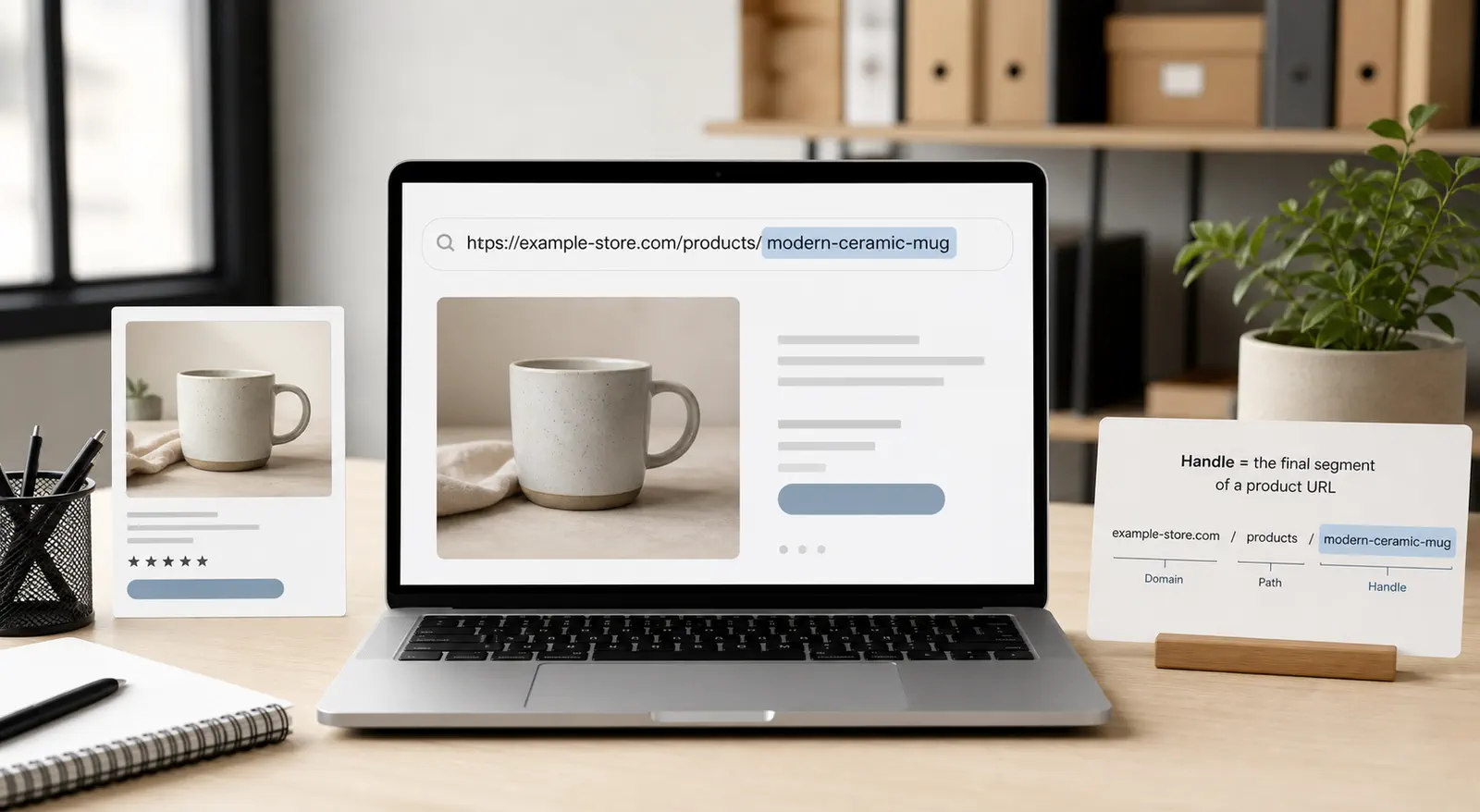
A Shopify handle is a lowercase text identifier that forms the readable final segment of a resource URL.
For example, a product named Classic Canvas Bag might use this URL:
your-store.com/products/classic-canvas-bag
The handle is classic-canvas-bag. The /products/ portion identifies the resource type, while the handle identifies that specific product within the product route.
Shopify typically creates the initial handle from the title. Spaces become hyphens, capitalization is removed, and characters unsuitable for a URL are normalized. Shopify’s official handle documentation also explains that handles must stay unique and that changing an existing resource title does not update the handle automatically. The handle should therefore be treated as a stable URL element, not just editable wording.
A handle is not the same as a product title, SKU, barcode, or product ID:
| Store Element | Main Purpose | Usually Visible to Customers? |
|---|---|---|
| Product title | Names the product on the storefront | Yes |
| Handle | Identifies the product in its URL | Yes, in the URL |
| SKU | Helps identify and manage a variant | Sometimes |
| Product ID | Internal platform identifier | Usually not |
The distinction matters because changing an existing resource title does not update its handle automatically. A store may display a new product name while its URL still contains the older wording.
Where Are Shopify Handles Used?

Shopify handles are used to identify several store resources and to build their public URLs.
Common examples include:
- Products:
/products/classic-canvas-bag - Collections:
/collections/travel-bags - Pages:
/pages/shipping-information - Blogs:
/blogs/store-journal - Blog articles:
/blogs/store-journal/how-to-pack-light
Handles also appear in Shopify themes and Liquid. A theme developer can use a handle to refer to a resource or compare values in a template. Apps, feeds, integrations, and custom processes may also store or depend on URLs that contain handles.
This creates an important operating rule: treat a live handle as more than editable wording. Before changing it, consider everywhere the current URL may be used, including navigation, advertisements, QR codes, social posts, external backlinks, product feeds, and documentation.
The same text can sometimes be used by different resource types because the route separates them. For example, a product and a collection could both use summer-sale, because one URL begins with /products/ and the other with /collections/.
Where Can You Find a Shopify Handle?
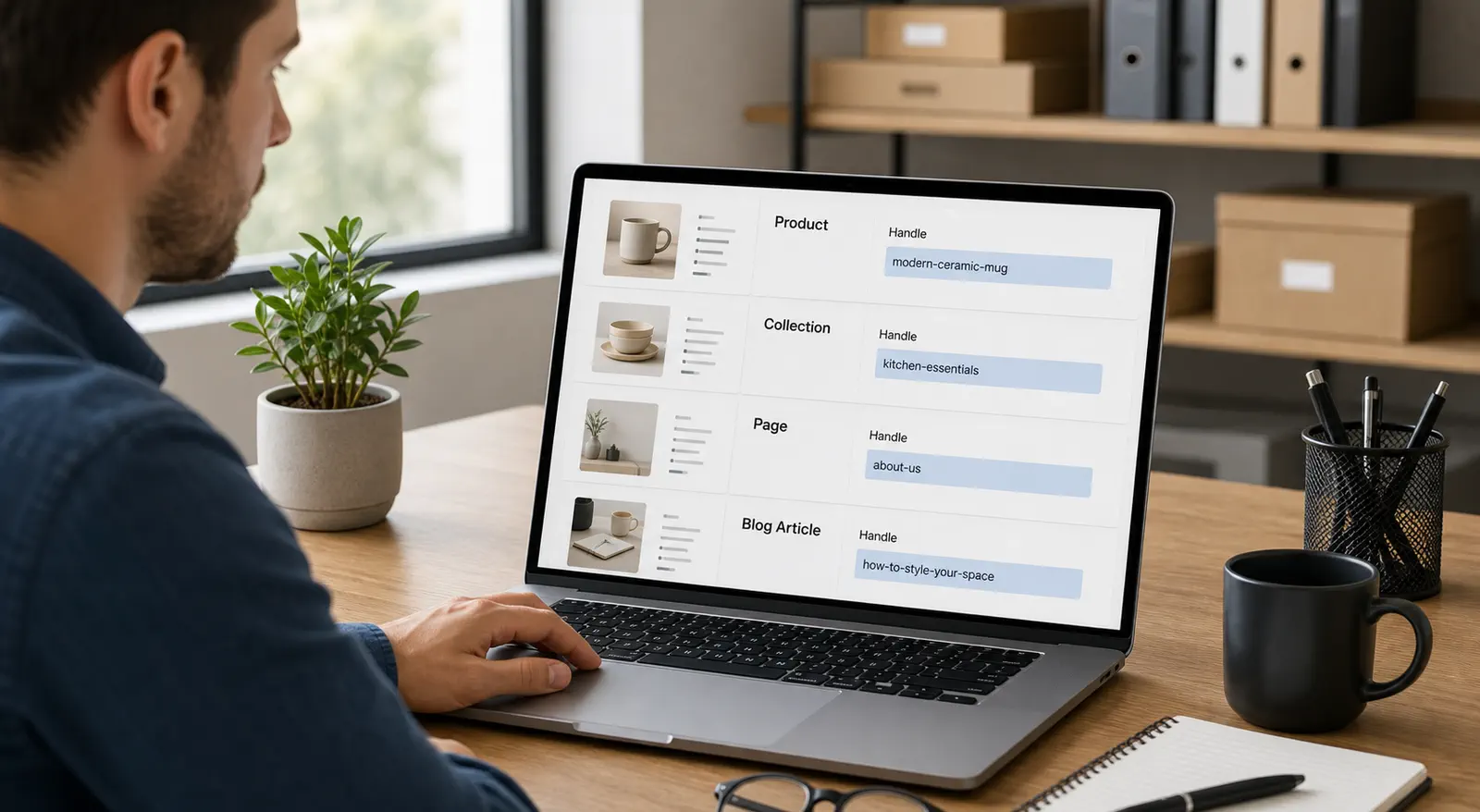
You can find a Shopify handle by opening the relevant resource in Shopify admin and locating its search engine listing or URL handle field.
The exact admin navigation can change as Shopify updates its interface, but these are the common routes:
- Product: Go to Products, select the product, then find its search engine listing and URL handle.
- Collection: Go to Products > Collections, select the collection, then find its search engine listing and URL handle.
- Page: Go to Online Store > Pages, select the page, then find its search engine listing and URL handle.
- Blog article: Go to Content > Blog posts, select the article, then find its search engine listing and URL handle.
The handle appears at the end of the displayed URL path. For example, if the product URL preview ends with /products/classic-canvas-bag, its Shopify product handle is classic-canvas-bag.
If you cannot find the field, open the resource first and look for an option to edit its search engine listing. Store permissions, resource type, and future admin-interface changes may affect what you see.
How Are Shopify Handles Used in Liquid?

In Shopify Liquid, developers can output or compare a resource’s handle when building theme behavior.
Common Shopify Liquid handle examples include:
{{ product.handle }}`n{{ collection.handle }}`n{{ article.handle }}A theme may use a handle to identify the current product, collection, page, blog, or article and apply specific content or logic. Developers may also convert text into handle format with Shopify’s handle or handleize filters.
Store owners do not need to edit Liquid for ordinary handle management. However, if a theme, app, feed, or custom workflow depends on a specific handle, changing that handle can break the reference unless the related code or setting is updated.
How Do You Change a Shopify Handle Safely?
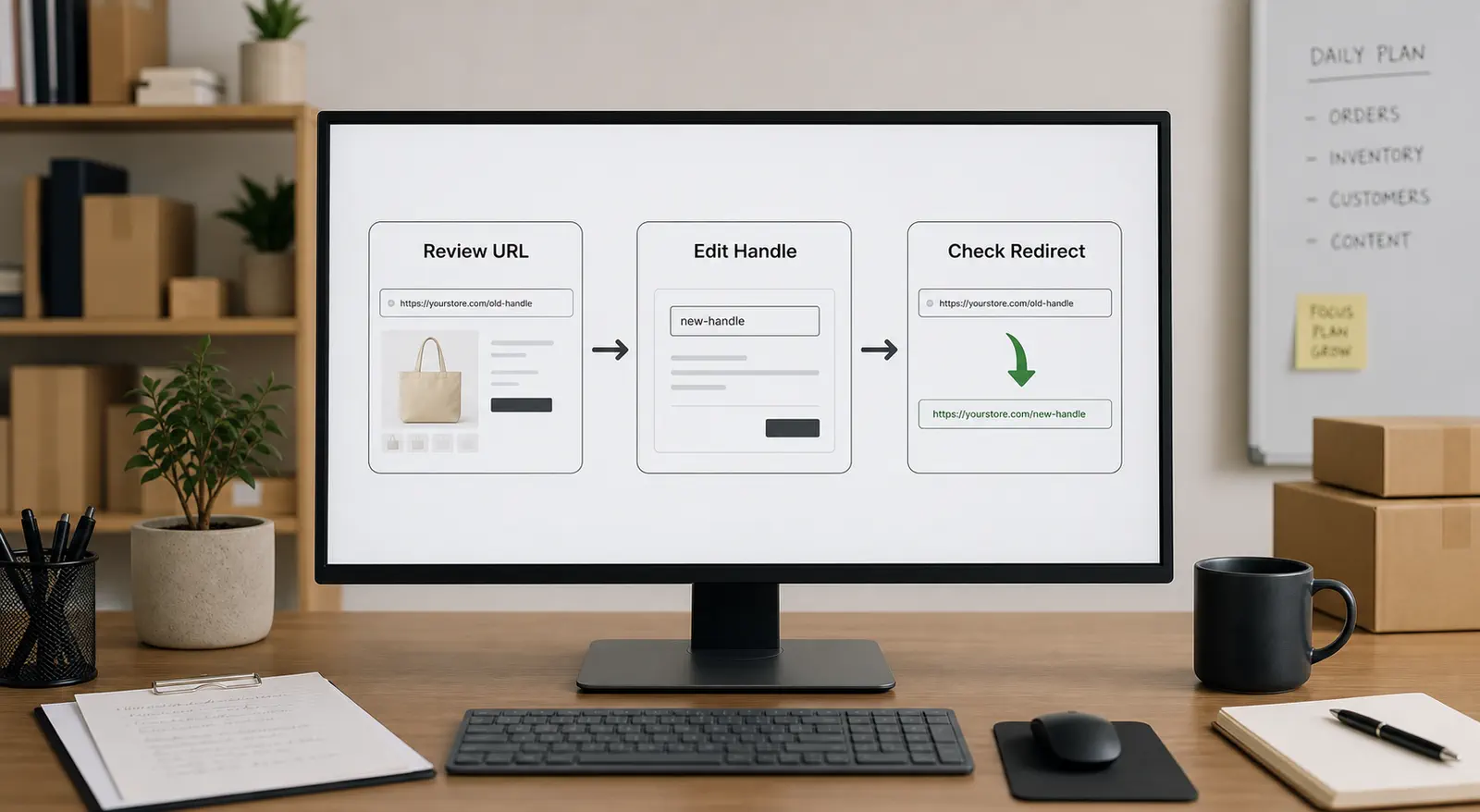
Change a Shopify handle safely by reviewing the existing URL, editing the URL handle in Shopify, preserving the old path with a redirect, and testing both URLs.
For a product, collection, page, or blog article, open the resource in Shopify admin and find its search engine listing or URL settings. Edit the Shopify URL handle, save the change, and confirm the new public page loads correctly. Shopify’s current help documentation explains that URL redirects can send visitors from an old URL to a new one.
Use this checklist before and after the change:
- Record the old URL. Keep the full path so you can test it after saving.
- Choose a durable new handle. Use wording that is accurate and unlikely to need another quick change.
- Create or confirm the redirect. When Shopify offers an option to create a redirect, keep it enabled unless you have a specific redirect plan.
- Update important controlled links. Replace the old URL in menus, campaigns, feeds, QR codes, internal documents, and integrations you manage.
- Test the new and old URLs. The new URL should load the intended page, and the old URL should reach the correct destination.
- Check connected workflows. Review apps, sales channels, product feeds, ads, and custom systems that may store full product URLs or use handles as lookup values. For example, when a Shopify store connects products to another sales channel through Shopify product catalog sync, changing a live handle may require checking redirects, product links, and synced storefront references.
Do not redirect an old URL to an unrelated page merely to avoid a 404. A redirect should preserve the visitor’s intent. If a product has no relevant replacement, decide whether a useful collection or explanatory page genuinely serves the same need.
Shopify redirects have limitations: some fixed paths cannot be redirected, and a redirect only works when the source URL is broken. Test the old URL after saving instead of assuming the redirect works.
You can review Shopify’s official guidance on creating and managing URL redirects before changing important live paths.
What Are Shopify Handle Best Practices?
The best Shopify handles are concise, descriptive, readable, and stable enough to remain useful when merchandising copy changes.
Follow these practical guidelines:
- Use words that clearly describe the resource.
- Separate words with hyphens.
- Remove unnecessary filler, promotional phrases, dates, and temporary campaign language.
- Keep the handle relevant to the page instead of forcing extra keywords.
- Avoid changing a live handle only because the product title changed.
- Check for redirects and dependent links whenever a change is necessary.
- Use a consistent naming approach across products and collections.
For example, classic-canvas-bag is usually more durable than best-classic-canvas-bag-summer-sale-2026. The shorter version remains understandable after the campaign ends and is easier for a person to read or type.
Product-title changes deserve special attention. If you rename Classic Canvas Bag to Everyday Canvas Tote, Shopify continues using the existing classic-canvas-bag handle unless you change it separately. That is not automatically a problem. Keep the old handle when it remains accurate and already has useful links or visibility. Change it only when the old wording is misleading, incorrect, or inconsistent with a deliberate URL plan.
Store operators managing many products should document their handle rules. A simple naming standard can help staff, agencies, and developers make consistent decisions without treating every title update as a reason to change URLs.
Key Takeaways

Shopify handles are simple to edit, but they should be managed as durable parts of your store’s URL structure.
- Know what the handle controls. It identifies a resource in its URL and remains separate from titles, SKUs, and internal IDs.
- Protect live links when making changes. Record the old URL, confirm a relevant redirect, update controlled links, and test connected workflows.
- Prefer stability over constant optimization. Use readable, descriptive handles and change them only when there is a clear reason.
Frequently Asked Questions
Does changing a Shopify product title change its handle?
No, changing an existing product title does not update its current handle automatically. Review the Shopify product handle separately when you rename a product, then decide whether keeping the established URL or changing it better serves customers and your URL plan.
Is a Shopify handle the same as a URL?
No. The handle is one part of the URL. In /products/classic-canvas-bag, the handle is classic-canvas-bag, while the full path also includes the product route.
Where do I find a Shopify product handle?
Open the product in Shopify admin, locate its search engine listing, and view or edit the URL handle. It is the final segment shown after /products/ in the product URL preview.
What is a Shopify handle in Liquid?
In Liquid, a handle is a resource property that themes can output or compare, such as {{ product.handle }} or {{ collection.handle }}. Changing a handle may require updates when theme code or an app depends on its previous value.
What happens if I change a handle without a redirect?
The old URL may stop taking visitors to the intended page. This can break saved links and other references to that path, so verify or create an appropriate redirect whenever you change a live handle.
A well-managed Shopify handle gives each resource a clear, durable URL while reducing avoidable link problems. Define a simple naming standard, protect redirects when URLs change, and include handle checks in product-update and store-maintenance workflows.
If your Shopify store already has steady orders, product URLs and handles are only one part of store operations. Runtodropship is a China-based private dropshipping agent team that can coordinate the China-side backend behind your product data, including sourcing, agreed product checks, packaging confirmation, order execution, shipping arrangement, and after-sales follow-up. Send your product links and current order requirements to discuss the next practical step.