

You submit an Alibaba RFQ for one product and receive prices that seem easy to rank. Then one quotation excludes packaging, another uses a different material, and a third covers delivery only to a departure port. Choosing the lowest figure could mean approving a different purchase from the one you intended.
Alibaba.com’s Request for Quotation (RFQ) service invites suppliers to respond to a stated sourcing requirement. Prepare one specification, post the request through the buyer form, screen responses for fit, and compare prices only after the product and commercial terms match. Record any differences you have not resolved.
When is Alibaba RFQ the right way to request quotes?
Alibaba RFQ suits a buying task when you can describe the required product clearly and want responses from suppliers you have yet to shortlist.
A broad buying request or a supplier-specific inquiry?
A broad request gives interested suppliers a common brief to answer. A direct inquiry is more focused when you already have a particular supplier or listed product in mind and need that seller to confirm details. Alibaba’s buyer sourcing overview presents RFQ as one route for finding products and sellers.
Choose the route according to what you need next:
- Use an RFQ when you need potential suppliers to confirm whether they can meet a defined requirement.
- Contact a particular seller when the unresolved questions concern its product, customization options, or quotation.
- Refine the requirement first when you cannot yet distinguish an acceptable product from a substitute.
The guide to sourcing and fulfillment through Alibaba covers inventory planning and order fulfillment. Use this RFQ to obtain replies to one defined requirement.
Alibaba.com Buyer Central’s RFQ video overview explains the broad request process. The video dates from 2021; follow the current buyer controls described below for the submission steps.
What must you define before you open the buyer form?
Define a versioned product requirement, quantity, permitted exceptions, and quotation scope before entering the RFQ form.
Build one version of the requirement
Give your brief a revision identifier, such as RFQ-R1, and use it on the document and related drawings. Ask suppliers to name that revision in their responses so you can see which requirement each price covers. Descriptions such as “premium quality” leave the supplier to decide what you mean; measurable dimensions, named materials, and an intended use give a clearer basis for answering.
Build the brief around these details:
- Product and variant: identify the exact item, model, material, dimensions, and relevant tolerances.
- Quantity and unit: state whether the request covers individual pieces, sets, cartons, or another defined unit.
- Essential conditions: specify required function, finish, labeling, and product-specific documentation.
- Packaging and delivery: describe the packing arrangement and destination or delivery scope to be quoted.
- Quotation response: request the revision reference, inclusions, exclusions, validity, and any assumptions.

Illustration: identify the product, material, and packaging before requesting prices.
Record permitted exceptions
Tell suppliers which requirements are fixed and which alternatives you will consider. Ask them to label an exact match, proposed alternative, or unresolved question beside the relevant requirement. A photograph can show appearance, but it may leave material, internal construction, or dimensions uncertain.
For example, an alternative material should appear as a separate proposal with its own price basis. Keep that proposal outside the main comparison until you decide whether it meets the buying need. If you accept it, update the requirement revision and ask the remaining suppliers to respond to the revised brief.
How do you post an RFQ from the current buyer interface?
Start at the buyer RFQ page, open the details form, complete the required product and quantity information, and review the sharing and posting confirmations before posting.
Start with the verified buyer controls
The desktop Alibaba RFQ entry page provides an Upload file control, an area for describing the requirement, an AI-assistance option, and a Write RFQ details button. Prepare the requirement before choosing how to enter it. If you use AI assistance, check the resulting text against your brief for added assumptions or missing conditions.
Choose Write RFQ details to open the buyer form. Use the buyer request route rather than seller instructions for finding RFQ leads or submitting supplier quotations. Keep attachments and the written description consistent so a supplier does not have to choose between conflicting versions.
Review the form before posting
The details form marks Product name, Detailed requirements, and Sourcing quantity as required and provides a quantity-unit selector. Enter a product name a relevant supplier can recognize, then put the specification and response instructions in Detailed requirements. Check the selected unit against the number you entered, especially when a set contains several pieces.
Before choosing Post request:
- Read the Business Card sharing option and decide whether the information shared with quoting suppliers is appropriate.
- Review the Buying Request Posting Rules confirmation shown in your account.
- Check the completed description and files against your current requirement revision.
- Follow the attachment guidance displayed in your interface rather than assuming an old tutorial’s limits still apply.
Which replies are ready for a supplier shortlist?
A supplier reply is ready for the shortlist when it addresses your mandatory requirements and provides enough specific information to justify further evaluation.
Screen for product and supplier fit
Read each response against the requirement before considering its headline price. A catalog link or “we can supply this” message establishes contact, but leaves the product fit unresolved. Ask whether the responder can explain how its proposed item meets the required function, material, dimensions, and packaging conditions.
Check the supplier’s relevant capability separately from the product description. If your request needs a particular manufacturing process or inspection record, ask for evidence relevant to that work. A claim about general experience does not confirm that the supplier can meet your particular requirement.
Keep incomplete responses out of the comparison
Record each reply in a worksheet with a supplier reference, received date, requirement revision, and a short decision. This is a manual screening method you can use alongside the correspondence:
- Ready: the mandatory requirements are addressed and the quotation basis is clear enough to examine.
- Clarification needed: an unanswered condition, assumption, or proposed substitution could change the decision.
- Unsuitable: the supplier confirms it cannot meet a requirement you have decided to retain.
Keep the reason beside the decision so another reviewer can understand it without rereading every message. Consistent supplier communication for dropshipping orders also helps you preserve those answers as the discussion develops. Return a fast but incomplete reply for clarification.
How do you compare quotes without hiding cost differences?
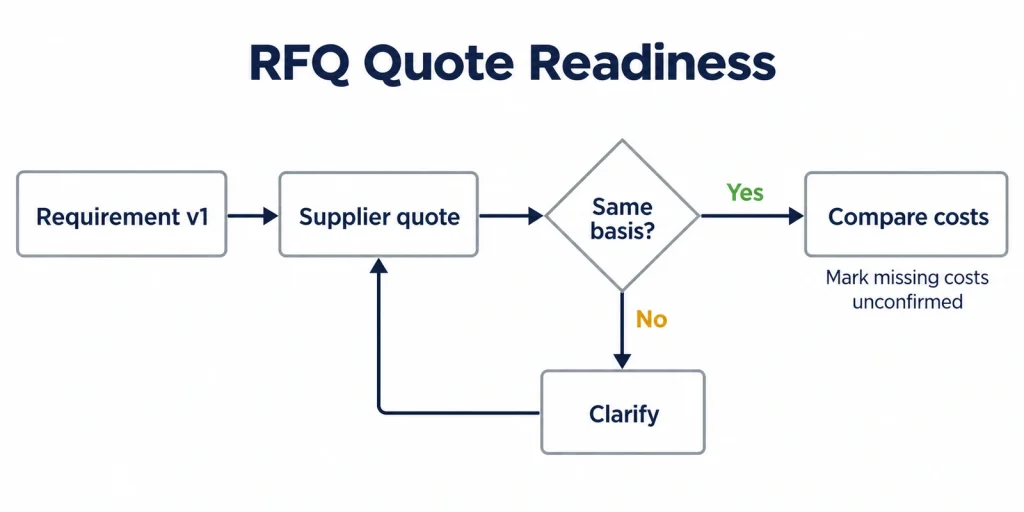
Compare quotations only after they cover the same requirement revision, quantity, unit, packaging, and stated delivery scope.
Put quotations on a common basis
Create one comparison record for each usable quotation and keep the original response alongside it. Record the quoted currency and distinguish recurring unit charges from separately quoted setup, packaging, or other charges. Compare totals only across the same included components; keep any incomplete total clearly qualified.
Use the following checks before ranking prices:
| Comparison condition | Common basis to confirm | Action if it is missing or different |
|---|---|---|
| Requirement revision | The same product specification and accepted exceptions | Hold the quote until the supplier identifies its basis |
| Quantity and unit | The same volume and definition of a piece, set, or carton | Request a quotation on the agreed unit basis |
| Price and delivery scope | Stated currency, named delivery term where used, and named place | Ask what movement and charges the price includes |
| Packaging | The same unit packing, labeling, and outer-carton requirements | Obtain a separate adjustment or revised quote |
| Exclusions | Each omitted component explicitly identified | Mark the component unconfirmed and seek clarification |
| Validity | A stated validity period relevant to the decision date | Request confirmation before relying on an expired quote |
Make exclusions and unknowns visible
Enter “unconfirmed” when freight, packaging, inspection, or another requested component has not been quoted. A blank field must not become zero in a spreadsheet calculation. If you can compare only a confirmed subtotal, label the subtotal and list what it excludes beside it.
A material or packaging substitution changes what you are pricing. Decide whether it is acceptable, record the resulting requirement revision, and request comparable quotes before ranking the totals.
How should you resolve missing answers and quote changes?
Send one numbered clarification tied to the requirement revision, then review the supplier’s revised quote before comparing it.
Send one consolidated clarification
Collect the open points into a single message so the supplier can respond to each one. Reference the relevant requirement and ask for a confirmation, a stated exception, or a revised quotation. Avoid combining a product question, a freight question, and a packaging change in an ambiguous sentence.
For a quotation missing material confirmation and delivery scope, your message could ask:
- Does the quoted product meet the material specified in RFQ-R1? Identify any difference.
- Which named destination or handover point does the quoted price cover?
- Is the required packaging included? If excluded, provide the additional charge separately.
- Please issue a revised quotation identifying RFQ-R1 and answering each outstanding point.
Check the revised reply against the same brief
Save the revised quote with its date and version, and mark the previous version as superseded. Check that an answer to one question has not introduced a change elsewhere. “Confirmed” is useful only when you can identify precisely what the supplier has confirmed.
If you change the requirement yourself, issue a new revision and explain the difference to everyone still under consideration. Record accepted exceptions and unresolved points separately. Return the response to the price comparison only when those decisions leave it on the same basis as the other quotations.
Which checks should the shortlisted supplier’s sample confirm?
The shortlisted supplier’s sample should confirm that the proposed product and packaging meet the accepted requirement, including any recorded exceptions.
Test the sample against the accepted requirement
Link the sample request to the quotation version and specification revision you selected. Define the checks before examining the sample so an attractive finish does not distract from an incorrect dimension or function. Use appropriate product-specific testing or specialist review where your checks require it.
Record the sample findings against:
- Product identity, variant, material, dimensions, and relevant functional checks.
- Finish, labeling, unit packaging, and the agreed packing arrangement.
- Differences from the accepted specification and the supplier’s proposed corrective action.
- Items the sample cannot establish, including consistency across a later production batch.

This warehouse photograph shows outer cartons and individually packed parcels. Check each packaging layer against your specification; the photograph does not establish that a supplier’s sample has passed inspection.
A sample approval should state what was checked and which conditions remain open. Keep dated photographs alongside the written sample findings. RuntoDropship is a Private Dropshipping Agent whose sourcing and supplier coordination service can support product sourcing and QC coordination for ecommerce sellers. Agree on the inspection scope and reporting requirements for your product before arranging that work.
Conclusion
A usable RFQ process leaves you with qualified supplier replies and prices tied to one accepted requirement. Preserve the specification revision, hold unresolved deviations, and keep missing costs visible before choosing a quotation to take forward.
RuntoDropship can help ecommerce sellers coordinate sourcing, supplier communication, and quality checks as a Private Dropshipping Agent. Our sourcing approach favors requirements suppliers can confirm and checks buyers can review. If you need help reviewing your next sourcing step, contact RuntoDropship with your product brief, current quotations, and the questions that remain unresolved.
FAQ
Can US buyers use the global RFQ workflow?
The global RFQ page includes a US-delivery setting. Check the posting rules displayed for your account and the requirements for your product. A delivery setting alone does not establish account eligibility or whether a product can be imported.
Can I request a small custom trial order?
You can describe a small custom trial in your request, but each supplier must confirm whether it will accept it. Ask for trial-specific conditions, including setup or tooling charges and any minimum production quantity. Keep future volume conditional rather than promising larger orders to obtain a trial quotation.
How can I close an RFQ I no longer need?
Alibaba’s official desktop help describes closing an RFQ through Buying Leads > My RFQs rather than deleting it. Find the relevant request and check the management options in your current account, as menu labels can change. Consult official support if you cannot locate the close control.
What should I do if my RFQ will not submit?
Save the requirement text, exact error, time, and visible status before retrying. Check whether the request already exists or was rejected; official help describes editing rejected requests in My Alibaba. Follow the displayed posting rules and contact official support with the error details if the cause remains unclear.
Does an RFQ replace a purchase order?
No. An RFQ requests quotations; a purchase order records a later order and its terms. Review the actual order documentation and payment conditions before approving that next step. Check the terms attached to the action you are taking rather than assuming every quotation, invoice, or platform action has the same effect.