

A supplier changes a variant while paid orders are still open. Tracking arrives late, and customers ask where their parcels are. You search for dsers alternatives, but a new app may leave the supplier problem intact while those orders keep moving through the old route.
Compare replacement options by the work that must change. Choose an order app for failed automation, a supplier network for limited product access, or a private agent for hands-on sourcing and fulfillment. Keep DSers where it works; test one product and order before moving the catalog.
What should a DSers alternative actually replace?
A DSers alternative should replace the failing job in your workflow, whether that is product import, variant mapping, order placement, supplier access, dispatch, or tracking. A new dashboard cannot inspect a parcel, and a new supplier does not automatically update your storefront inventory.
Which jobs belong to software and which to suppliers?
Software connects product and order records; a supplier or fulfillment partner handles the physical product. Start with a recent order and write down who owned each handoff:
- Listing: who imported the product and mapped each store variant to a supplier SKU?
- Purchase: who placed and paid for the supplier order after the customer paid you?
- Parcel: who checked the item, packed it, selected the carrier, and posted tracking?
- Exception: who answers when stock, address, damage, or delivery goes wrong?
A product research tool may help you find an item but still leave every order-placement and parcel task elsewhere. Treat that tool as an addition to the workflow unless it demonstrably performs the missing job.
What evidence shows the bottleneck is real?
Before comparing subscriptions, look at ten recent orders rather than one troublesome screenshot. Record the number with a supplier substitution, a wrong variant, a late first scan, or a refund request; then trace the cause to a specific handoff.
For example, if tracking is created on time but the first carrier scan is late, another import app may have little effect. Ask the party controlling dispatch for a lane-specific explanation and a sample tracking trail. Key Takeaway: Select a replacement for the handoff you can document, not for the longest feature list.
When is keeping DSers the better choice?
Keeping DSers is sensible when its current order flow works and the issue can be solved through supplier choice, mapping, or a limited second workflow.
Can you solve the problem inside the existing workflow?
DSers’ current supplier-platform documentation lists 1688, Alibaba.com, and agent-related routes alongside AliExpress. Check what your account and product can use before paying for another app. Check these points against your problem:
- Can you remap one weak supplier without changing the storefront listing?
- Does the available plan update the stock or price field you need, at the interval you need?
- Who receives the order exception, and can that person resolve it before you promise a customer anything?
When does a limited parallel test beat a full replacement?
Keep stable products on the present route while you trial a second route for a product that exposes the failure. Shopify can represent fulfillment services as inventory locations. Check product assignment and routing before the trial.

Write down a stop condition as well: an unmapped variant, a duplicate fulfillment request, or a tracking update that never reaches the customer-facing order. Key Takeaway: Retaining a working route while testing a specific weak product protects current orders and gives you a fair comparison.
Which apps fit an order-automation problem?
Order-automation apps fit when the bottleneck is importing products, mapping variants, placing supplier orders, or monitoring changes across a store. AutoDS and Dropified advertise combinations of these functions, but the useful comparison is which feature works for your store, supplier, plan, and order volume.
What should you compare across automation apps?
If you need a focused comparison with one named option, our DSers and AutoDS workflow comparison covers that pair in more detail; this guide evaluates the wider replacement decision.
- Import: Does the app preserve variant names, images, and shipping settings you need?
- Order: Is purchasing automatic, one-click, or still completed in the supplier account?
- Monitoring: Which supplier changes trigger alerts, and which plan includes them?
- Exception: Can you see an order that failed to route, or only an aggregate status?
Which test exposes a weak app fit?
For example, import a product with multiple variants, including one that a supplier cannot currently fulfill. Place a controlled test order, then compare the store order, app order, supplier order, and tracking event. Ask support to explain a failed mapping before you commit; the answer shows whether the tool can help your team when the workflow breaks. Key Takeaway: Buy automation only after the exact product and order path you rely on works in a controlled test.
Which options change your supplier access?
Supplier platforms change which products and sellers you can reach; an import app can change the way you handle orders without changing the underlying supplier. Spocket advertises a regional supplier catalog, while Zendrop and CJdropshipping advertise sourcing and fulfillment services alongside app connections.
What can a catalog or supplier network solve?
A catalog can shorten supplier discovery and sometimes combine product selection with order routing. Check the actual item rather than the size of the advertised catalog.
- Request the supplier SKU and stock location for the variant you will sell.
- Ask whether the quoted dispatch point is where that item is stored now.
- Confirm who buys the product, who packs it, and which party handles a damaged arrival.
What questions reveal whether the supplier is suitable?
If quality or packaging affects repeat sales, request a sample and product specification. Use a private sourcing agent brief to frame those questions when the problem calls for hands-on supplier coordination.
Look for a named person or team who will respond to stock and quality exceptions, rather than a general promise of support. Key Takeaway: Supplier access is useful only when the exact product, stock, dispatch origin, and exception owner are clear.
When does a private agent make more sense than an app?
Consider a private agent for hands-on sourcing, supplier communication, packing, or shipping exceptions. The arrangement still needs a defined way to receive orders and return tracking to the store.
What responsibilities must be written down?
Treat the discussion as a responsibility map. For each stage, identify the operator, the evidence you will see, and the response required when the stage fails:
- Who confirms the supplier and approves a substitute item?
- Who checks the sample or purchase against the agreed specification?
- Who holds inventory, if any, and who pays for unsold stock?
- Who uploads tracking, answers a missing scan, and authorizes a return?
If the app remains responsible for product records while the agent handles procurement and parcels, agree on the interface between them before orders begin.
How do you evaluate the service without relying on promises?
Give each candidate the same product, destination, and packaging brief. Request a line-item quote, inspection method, order-data format, and exception path.

Ask what happens when the approved supplier cannot provide the variant on the day an order arrives. Key Takeaway: Choose an agent only when the sourcing and parcel responsibilities you need are assigned, evidenced, and priced for your product.
How do you compare true cost and US delivery claims?
Compare landed cost and the actual delivery route for each SKU, not a starting subscription price or a broad promise of “US shipping.”
Which cost lines belong in one quote?
Use the same customer destination and order size for every candidate. Ask for the following inputs in writing, then calculate what remains after the expected selling price and payment fees:
| Input | Proof to request | Decision effect |
|---|---|---|
| Product and variant | Current supplier quote for the exact SKU | Exposes substitutions and price changes |
| Packing and handling | Itemized scope and charge | Shows what physical work is included |
| Carrier lane | Origin, service, charge, and tracking format | Tests the delivery promise |
| Software and exceptions | Plan limits, transaction fees, and return rules | Reveals costs outside the product quote |
However, a lower product quote can lose its advantage through handling and returns.
What would prove a US delivery claim?
Ask whether the exact SKU is stocked in the United States, where it is handed to the carrier, and whether replenishment depends on a later cross-border shipment. Then ask for recent tracking trails from that lane; one parcel cannot establish a guarantee.
Check these separately:
- Confirm stock origin and dispatch location for the exact SKU.
- Inspect the first carrier scan and destination return address.
Key Takeaway: Approve a delivery claim only after the stock origin, carrier handoff, and full landed cost are visible for your SKU.
How can you test inventory, variants and tracking?
Test inventory, variant mapping, and tracking as one chain using a small number of products and at least one controlled order.
Which records should you compare end to end?
Start with two variants and documented supplier SKUs. Compare:
- Storefront variant and its assigned inventory location.
- Supplier variant and stock response when an item is unavailable.
- Paid order, app order, fulfillment request, and supplier order IDs.
- Tracking number, first carrier scan, and customer-facing status.
Shopify’s guidance on fulfillment apps explains why app behavior must be checked per provider. The Shopify Academy overview of inventory locations helps your team inspect routing before a test order; the video supports this section’s location check.
What is the pass or fail threshold?
Define pass before the test: the ordered variant matches the supplier order, one party accepts fulfillment, and tracking reaches the customer-facing record without a manual repair. Record when stock or price changes are detected, rather than assuming the word “sync” means instantaneous updates.
Do not scale a trial that cannot account for a missing scan or an out-of-stock substitute. Key Takeaway: A small end-to-end test reveals inventory and tracking risk before it spreads across the catalog.
How do you move open orders without duplicate fulfillment?
Move open orders by assigning each one to a single fulfillment owner and checking its current request status before changing app routing.
What needs to be frozen before a cutover?
Export the product and variant mappings, supplier references, paid-but-unfulfilled orders, fulfillment requests, and tracking records. Before switching, mark the point at which new orders will go to the replacement route.
- Not requested: verify the intended location before sending a new request.
- Requested, not accepted: cancel the old request before reassigning it.
- Accepted or shipped: confirm cancellation or let the original provider finish; do not assume a status reset stops dispatch.
Shopify warns that reverting an order to unfulfilled does not cancel the provider’s work.
How do you prove rollback works?
Run a controlled order through the new route. Reconcile IDs and tracking, and document how to pause the new feed if it fails. Our guide to transitioning dropshipping agents goes deeper on the broader cutover; here the priority is one owner for every live order.
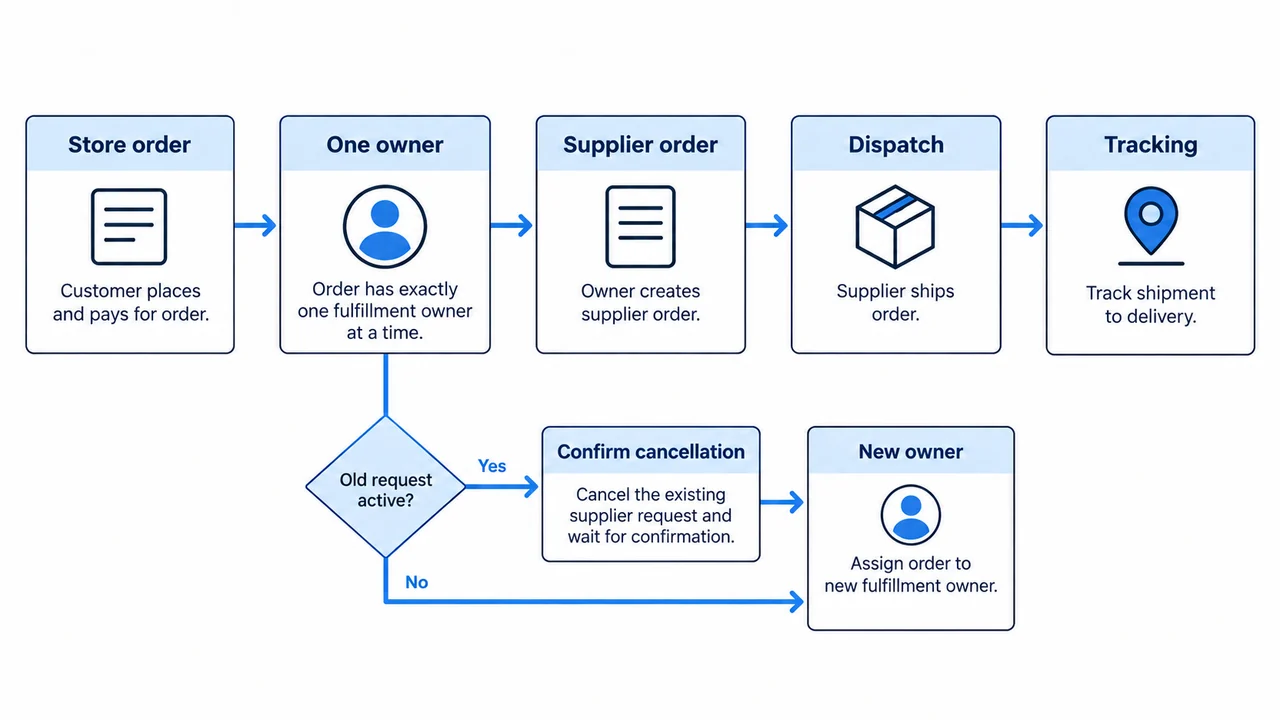
Key Takeaway: A migration is safe to expand only when open orders are reconciled and the rollback owner can prevent double fulfillment.
What should you ask before committing to a replacement?
Ask for proof that the replacement fixes the specific failure you found, then decide whether to keep DSers, add a second route, or switch.
What belongs in the final decision checklist?
Use the same brief for every candidate and keep the answers in one place:
- Exact product and variant match, with a fallback if stock changes.
- Named owner for order placement, packing, tracking, and returns.
- Landed cost for the same destination and order size.
- Evidence of a first scan and a customer-facing update.
- A cutover plan for paid orders and an exit route if the test fails.
When is the decision ready?
Decide after the test order works and exceptions have owners. Keep DSers if it already covers the job; add a supplier or agent if the physical handoff is weak; replace the app when its automation fails the trial. Record a review trigger such as a new supplier or changed carrier lane. Key Takeaway: Commit based on a tested workflow and a clear exit path, not a general ranking.
Conclusion
The right replacement depends on where your order breaks: software mapping, supplier access, or physical fulfillment. Compare candidates against that failure, verify cost and shipping for the exact product, and move live orders only after one owner is accountable for each handoff.
RuntoDropship is a Private Dropshipping Agent. We can discuss the sourcing, packing, and fulfillment responsibilities your current workflow leaves unresolved; contact us with the product, destination, and order flow you want to test. We favor clear ownership and verifiable order steps over broad promises about a new tool.
FAQ
Can one product use more than one supplier?
Often, yes, but the mapping and fallback rules depend on the app and product setup. Test each variant and confirm which supplier receives a paid order; a second source is useful only if it cannot trigger a duplicate purchase.
Is DSers still free?
DSers currently lists a Basic free plan alongside paid plans. Check the current plan limits for store connections, supplier accounts, monitoring, and the number of products you need before treating “free” as the cost of your complete workflow.
Is DSers trusted for a growing store?
No rating proves a fit for your store. Review permissions and support terms; test ordering, stock updates, and tracking with your product.
Can I keep my Shopify products if I uninstall DSers?
Storefront products and DSers supplier mappings are separate records. Before uninstalling, export mapping and order details, check any inventory held at the app’s Shopify location, and confirm the receiving workflow can handle open orders.
Can I run two fulfillment apps in one Shopify store?
Shopify can use multiple fulfillment locations and methods, subject to how each app handles products and orders. Assign a clear location and fulfillment owner for each product, then test an order that might otherwise route to both apps.