

To transition dropshipping agents without disrupting orders, separate every live order by owner, prove the new SKU and tracking workflow with test orders, then move new orders through a controlled cutover while the old agent finishes its remaining queue.
Quick Answer: Do not switch by disconnecting one system and connecting another on the same day. Freeze a cutover time, export the open-order record, assign each order and SKU to one accountable party, test the new workflow end to end, and keep a short overlap period with rollback rules. The storefront can remain unchanged; the work happens in order routing, product mapping, inventory confirmation, tracking, and exception ownership.
A typical migration starts when a growing store has already decided that its current supplier setup is no longer workable, yet the paid-order queue makes any change feel dangerous. One duplicate shipment, missed variant, or overwritten tracking number can turn a backend improvement into customer confusion. The safer direction is not a dramatic overnight switch. It is a documented handover in which every order has one owner and every status can be reconciled.
Transition Dropshipping Agents With a Controlled Cutover

A controlled cutover keeps the old workflow responsible for a defined order set while the new workflow receives only the orders released after an agreed boundary.
The boundary can be a timestamp, an order number, or a manually approved batch. What matters is that both agents use the same rule. Write it into a handover sheet with the last order owned by the old agent, the first order owned by the new agent, excluded SKUs, unresolved orders, and the person authorized to change ownership.
Before moving live traffic, confirm how your Shopify private dropshipping agent workflow will receive orders, map variants, report stock, create fulfillments, and return tracking. The cutover plan should then turn that workflow into an order-by-order procedure.
Do not let both parties automatically import the same live order feed. During overlap, either disconnect automatic intake for one party or use a clear release rule that prevents duplicate purchasing. A migration is safe when ownership is mutually exclusive, visible, and reversible.
Key Takeaway: Choose one cutover boundary and one owner for every paid order. If an order can appear in two active queues without a manual control, the migration is not ready for live traffic.
When Should You Transition Dropshipping Agents?
You should transition dropshipping agents when the current setup can no longer protect order accuracy, supplier communication, tracking updates, packaging consistency, or customer support at your current volume. The switch is usually more urgent when active orders are delayed because the old workflow cannot confirm stock, match variants, or return reliable tracking.
Do not switch only because another agent promises a lower quote. If your live order queue is already messy, a rushed migration can create duplicate purchases, missing tracking numbers, wrong variants, and customer refund pressure. The safer signal is not price alone. It is whether the new agent can prove SKU mapping, sourcing ownership, QC, dispatch control, and exception handling before live order volume is moved.
Before the cutover plan begins, use these dropshipping agent evaluation questions to test whether the replacement can prove those capabilities in writing and through a controlled trial.
Build an Open-Order Ownership Ledger Before the Switch

The open-order ledger is the single record that prevents paid orders from disappearing between two suppliers.
Start with every paid order that is not fully delivered, not merely every order marked unfulfilled. Some orders may already have labels, supplier purchase orders, partial shipments, or tracking numbers that have not started moving. Export your Shopify orders and combine that file with the old agent’s processing record. Shopify’s official guidance confirms that an order CSV export can include order numbers, fulfillment status, line items, financial status, and other order details, but you still need operational fields from the agent.
Add columns for:
- Shopify order number and date
- SKU, variant, quantity, and destination
- payment and fraud-review status
- current fulfillment owner
- supplier purchase status
- stock reservation or purchase evidence
- packing and dispatch status
- tracking number and first carrier scan
- exception, next action, owner, and deadline
Use three ownership labels: old agent, new agent, or seller hold. Never use vague labels such as pending migration. If the old agent has purchased a product but not packed it, decide whether that order stays put or can be canceled and reassigned without creating a duplicate purchase.
If the switch is part of an AliExpress to private agent transition, keep that background outside the ledger. The ledger should only show what must happen next for each customer order.
Set the Cutover Architecture Before Editing Shopify

The cutover architecture defines how orders move before anyone changes an app, location, permission, or automation.
Use four stages. First, freeze configuration changes and record the current integrations. Second, test the new connection with noncustomer or controlled orders. Third, release a small live batch. Fourth, expand only after reconciliation passes. This sequence makes the change observable and gives the team a clean rollback point.
Create a responsibility matrix for the old agent, new agent, and store team. Assign one party to each action: order acceptance, sourcing approval, inventory confirmation, packing, label creation, tracking write-back, cancellation, reshipment, and customer update. Shared responsibility often becomes no responsibility when a live exception appears.
Also record what must remain unchanged. Product URLs, customer accounts, payment settings, storefront content, and historical orders normally do not need to move just because the backend supplier changes. Limit access and configuration changes to the smallest practical scope.
Set rollback triggers before launch. Examples include an unmapped live SKU, duplicate order import, wrong fulfillment location, missing tracking write-back, or a test order that cannot be canceled cleanly. A rollback means pausing new releases while preserving the completed work; it does not mean erasing the audit trail.
Re-Source and Map Every Live SKU and Variant
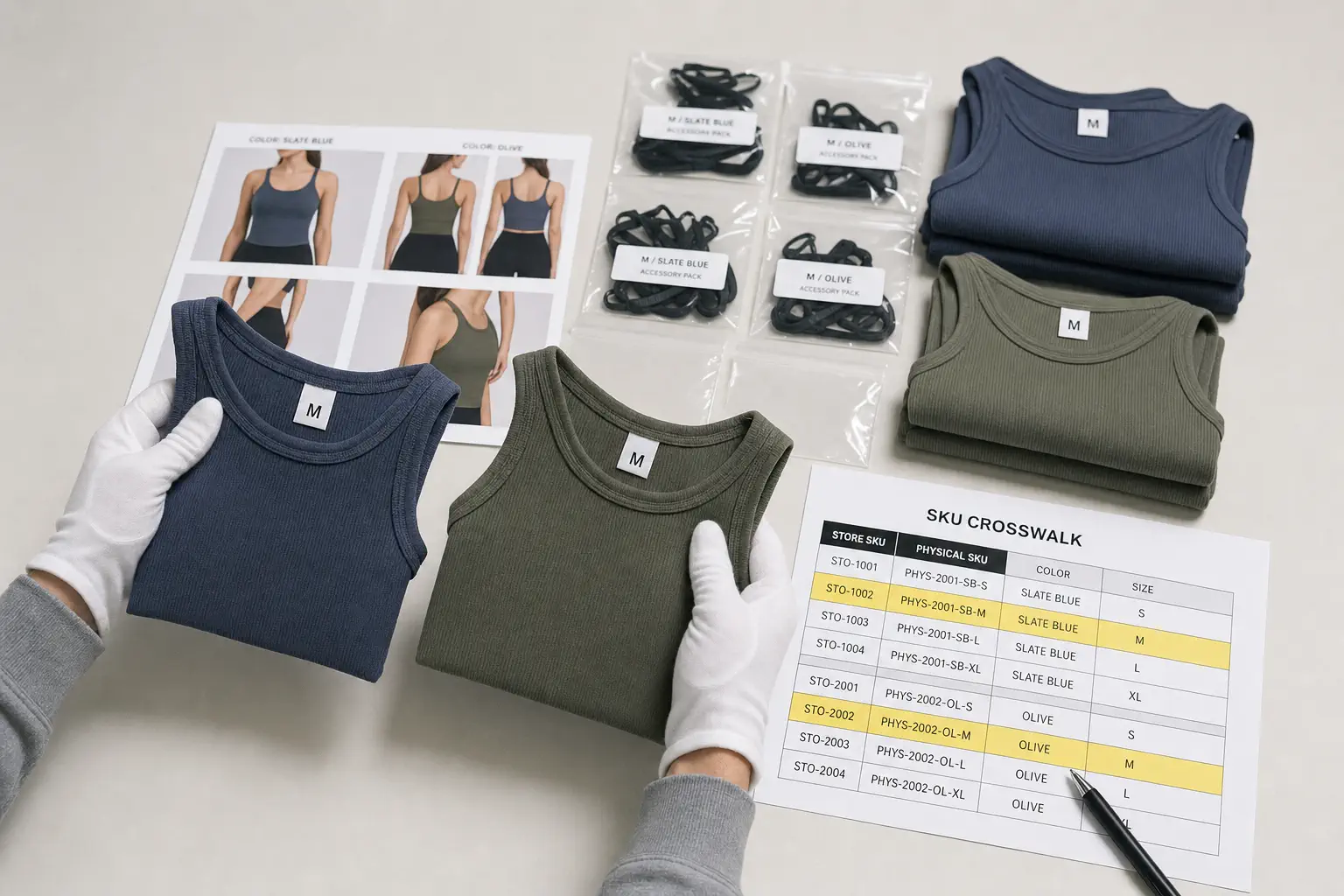
Every live SKU needs a verified physical product and a one-to-one mapping before the new agent can accept customer orders.
Product titles are not reliable identifiers. A single listing may contain different colors, sizes, plugs, bundles, materials, or package contents, while two suppliers may use entirely different internal codes. Build a SKU crosswalk that connects the Shopify variant ID and store SKU to the new agent’s physical SKU, supplier item, packaging instruction, and inspection reference.
Start with products that currently receive orders. For each one, provide the product link, reference photos, selected variant, required accessories, package contents, acceptable markings, and any customer-facing promise that must remain true. Then approve a sample or a clearly documented test unit before live release.
Use three mapping outcomes:
| Mapping result | Action |
|---|---|
| Exact approved match | Eligible for test orders |
| Material difference | Hold until the listing or product is approved |
| Unavailable or unverified | Keep with old source, pause the variant, or cancel safely |
Do not silently substitute a similar-looking item. A change in shade, material, plug, size fit, included accessory, or packaging can break the customer’s purchase expectation even when the product name looks identical.
Key Takeaway: Do not route a live order until the store variant, physical item, and packing instruction point to the same approved SKU. Automation can move a mapping error faster; it cannot make the mapping correct.
Reconcile Inventory, Packaging, and Supplier Commitments

Inventory and packaging must be reconciled separately from order data because neither automatically follows a Shopify connection. This inventory reconciliation also covers materials and supplier commitments that do not exist in the store database.
List stock held by the old agent, stock still at a supplier, products already allocated to orders, unallocated units, custom boxes, inserts, labels, and replacement parts. Record ownership, usable quantity, condition, location, transfer feasibility, and the evidence supporting each count. Do not treat a spreadsheet balance as physical confirmation.
Decide whether remaining materials will be consumed by the old agent, transferred, returned, or written off. A physical transfer can introduce its own lead time, receiving checks, and counting differences. For low-value or nearly exhausted materials, finishing the old queue may be safer than moving them. For valuable inventory, require a packing list and receiving reconciliation before making it available to new orders.
Supplier commitments also need a clean handover. Note open purchase orders, deposits, production status, molds, artwork, and approved samples. Confirm which relationships the new agent will coordinate and which stay under the seller’s control.
Keep inventory available-to-promise conservative during the overlap. If the same units appear available to both workflows, Shopify may continue accepting orders against stock that only one party can actually dispatch.
Configure Shopify Data, Locations, and Access Safely

In a Shopify fulfillment migration, configuration should change only after order ownership, SKU mapping, and physical availability are clear.
First, document the current apps, fulfillment services, locations, routing rules, notification behavior, and staff permissions. Take dated screenshots or export settings where practical. Then confirm what the new connection will create: a location, a fulfillment-service assignment, an app-managed workflow, or a manual order exchange.
Shopify assigns orders according to inventory and routing rules when multiple locations are active. Its location setup guidance also notes that orders can split when one location cannot fulfill the whole order. Review those rules before enabling the new location so a multi-item order does not unexpectedly divide between old and new workflows.
Give the new agent only the access needed for the agreed process. Store ownership, payments, theme editing, unrelated customer data, and marketing settings should remain outside the working boundary unless a specific task genuinely requires them. Record who approved each permission and when it should be reviewed.
Finally, protect historical records. Do not delete old orders, overwrite old tracking, or reuse an existing fulfillment merely to make the dashboard look clean. The migration record should preserve what happened and who performed it.
Run End-to-End Tests Before Releasing Customer Orders
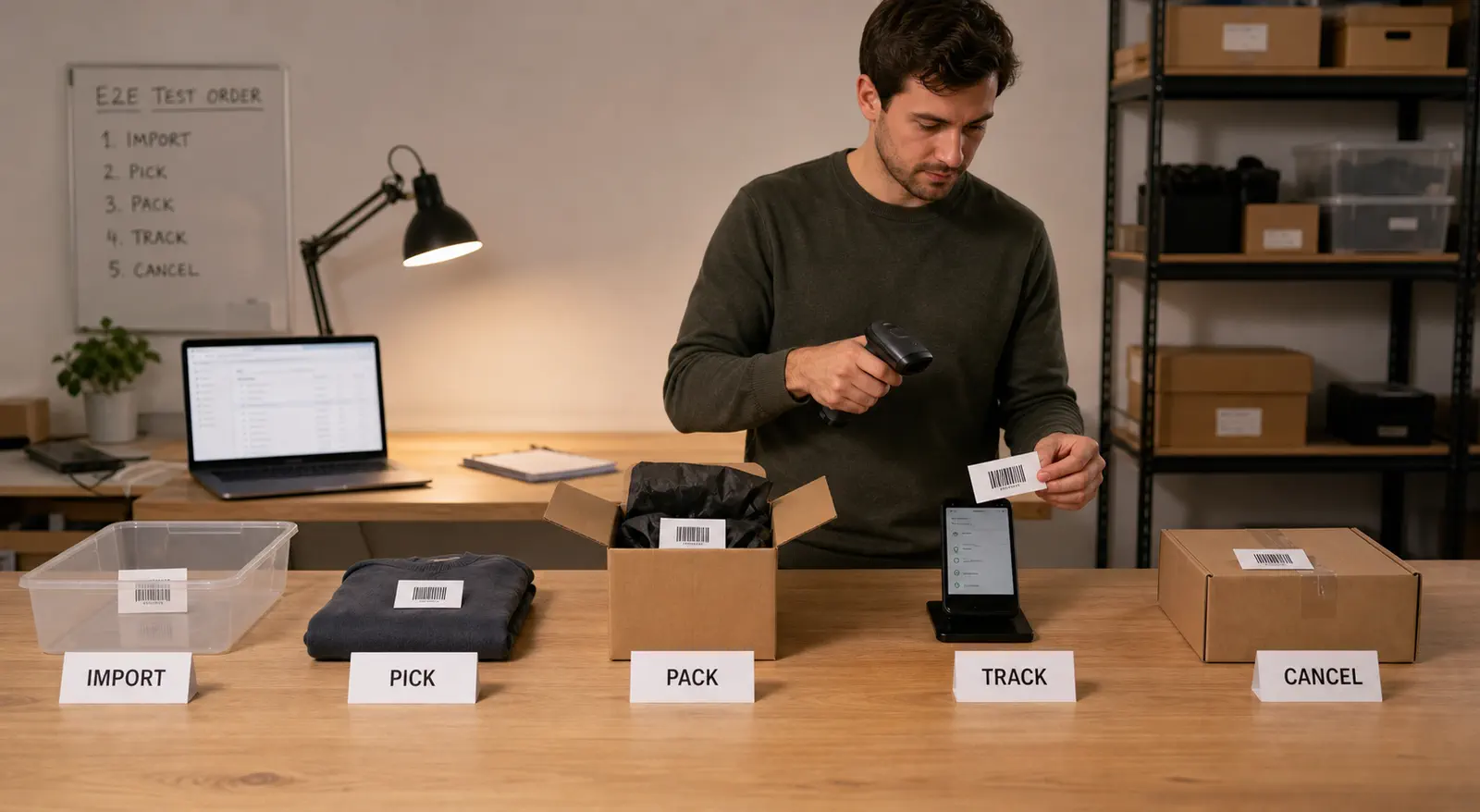
End-to-end tests prove the entire order path, not just whether an app says connected.
Create controlled orders that represent the real complexity of the store: a simple single-SKU order, a variant order, a multi-item order, a discounted order, and any market or address format that regularly creates exceptions. Use test products or orders that can be canceled and refunded according to your store’s procedure.
For each test, verify:
- The order appears once in the correct queue.
- Customer address fields and notes arrive intact.
- The correct SKU, variant, quantity, and packaging instruction are selected.
- Inventory changes in the expected location.
- The agent can accept, hold, cancel, pack, and dispatch the order.
- Tracking returns to the correct Shopify order without overwriting another fulfillment.
- Customer notifications match the store’s intended timing.
- The order can be reconciled from Shopify to the physical parcel.
Shopify warns that reverting an order to unfulfilled does not itself stop a service from shipping it. The cancellation must be confirmed with the service, or a duplicate shipment and charge can still occur. That distinction makes cancellation testing essential during a supplier change.
Key Takeaway: A successful connection test is not a successful migration test. Release live orders only after import, mapping, inventory, cancellation, dispatch, tracking, and reconciliation work as one chain.
Control the Overlap Window With Explicit Queue Rules

The overlap window is safe when it separates order ownership rather than asking two agents to work from one unrestricted queue.
Let the old agent finish orders already purchased, packed, or dispatched unless a specific exception makes reassignment safer. Send only post-cutover orders to the new agent, beginning with a small batch of approved SKUs. Reconcile that batch before increasing volume.
Hold a short daily handover during the overlap. Review new orders accepted, old orders completed, tracking without a first scan, cancellations awaiting confirmation, stock exceptions, address changes, and customer escalations. Write decisions into the ledger rather than leaving them in separate chat threads.
Communication rules matter here. A clear dropshipping supplier communication workflow gives each exception an owner, evidence requirement, response deadline, and escalation path. The business value is not more messages; it is fewer ambiguous decisions.
Do not choose the overlap length from a generic calendar. End it when the old queue has reached defined terminal states and the new process has passed its release checks. Some orders may stay open because they are in transit, but their operational owner and tracking responsibility should already be settled.
Preserve Tracking Continuity and Customer Context

Tracking continuity requires one authoritative number, one current status, and one owner for every shipment.
Keep the old agent responsible for tracking on parcels it dispatched. Do not replace a valid old tracking number simply because the new agent is now connected. If a shipment is canceled before carrier acceptance and recreated, document the old number, cancellation evidence, new number, and notification decision.
Review tracking in three groups: label created with no movement, carrier accepted, and moving or delivered. A label alone is not proof that the parcel entered the carrier network. During the overlap, compare agent dispatch records with carrier scans and Shopify status so silent gaps surface quickly.
When an update is needed, tell the customer what changed operationally without exposing internal blame or promising an unsupported date. Preserve prior messages so support staff can see the same context. This is especially important when an order contains multiple packages or a replacement shipment.
A structured tracking update support process becomes useful when status gaps need evidence, escalation, and a consistent customer response. It should continue the operational record rather than create a second source of truth.
Use an Exception Log and Predefined Rollback Triggers

An exception log turns migration problems into controlled decisions instead of scattered emergencies.
Record the order, issue type, current owner, customer impact, evidence, next action, deadline, and final resolution. Use a small set of consistent categories: duplicate import, unmapped SKU, insufficient stock, wrong location, address problem, cancellation conflict, packaging mismatch, tracking failure, and customer hold.
Pair the log with release and rollback rules. A single correctable test-order issue may justify a pause and fix. A repeated duplicate-import pattern, unverified live SKU, or tracking write-back that attaches to the wrong order should stop additional releases until the cause is understood.
Do not hide failures by manually forcing statuses to fulfilled. A clean dashboard is not the goal; a truthful chain from payment to parcel is. Manual intervention is acceptable when it is documented and reconciled.
Set an escalation ladder as well. The first owner investigates, an operations lead decides whether to hold the queue, and the seller approves customer-facing remedies or material product changes. Mentors and agencies managing multiple stores should keep logs separated by store so one client’s exception does not alter another client’s release decision.
Validate the New Workflow With a Cutover Scorecard
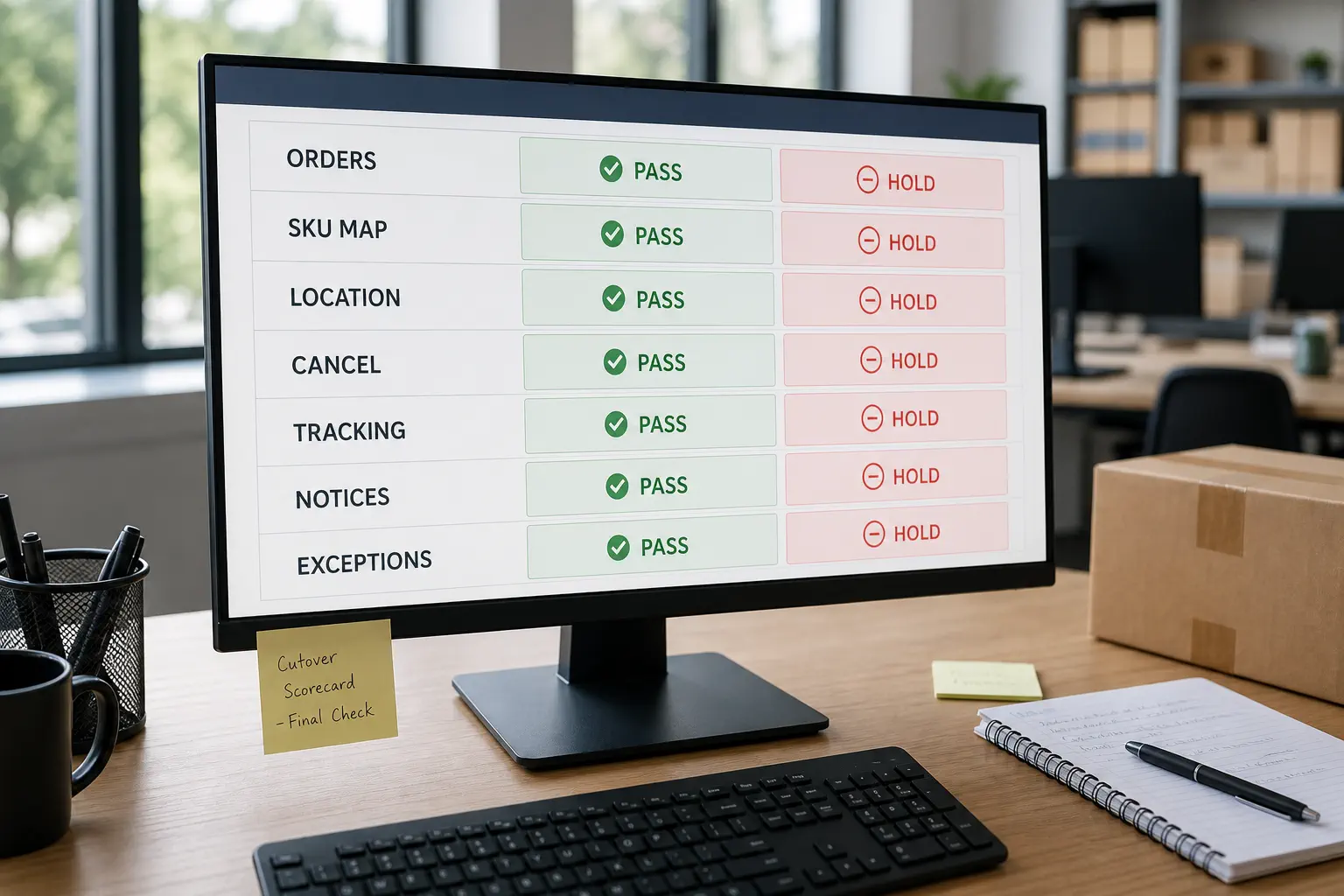
A cutover scorecard should measure whether the workflow is controlled, not whether the new agent made an impressive first impression.
Use factual pass or fail checks: all released orders imported once, every live SKU mapped, fulfillment location correct, test cancellations confirmed, dispatched parcels matched to tracking, customer notifications reviewed, open exceptions owned, and both order ledgers reconciled. Avoid setting performance targets that the short test period cannot support.
A real Shopify migration lesson from Yen Aura
Fulfilment Australia reports that Australian beauty brand Yen Aura completed a provider onboarding in five days while maintaining its Shopify order flow. The provider-published Yen Aura case study says the handover focused on continuity, presentation standards, and a structured operational setup. Because the account comes from the service provider, its performance figures should be read as case-specific claims rather than a universal benchmark.
The transferable lesson is the sequence, not the speed: define the customer experience that cannot break, keep orders flowing through a controlled handover, and validate the new operation from the first live batch. A dropshipping seller can apply the same discipline without assuming the same timeline or results.
Key Takeaway: Graduate the new workflow on reconciliation evidence. A short successful run is useful, but the release decision should rest on clean order ownership, correct mappings, traceable parcels, and closed exceptions.
Close the Migration Only After Both Queues Reconcile

The migration is complete only when the old queue has no unowned work and the new queue can operate without temporary workarounds.
Reconcile the old agent’s ledger against Shopify, supplier purchases, dispatched parcels, refunds, replacements, and remaining inventory. Every order should end in a defined state: delivered, in transit with an owner, canceled with evidence, refunded, replaced, or escalated with a next action.
Then remove unnecessary access and automation. Disconnect old order imports, revoke permissions that are no longer needed, archive credentials securely, and preserve historical records. Confirm what happens to leftover stock, packaging, deposits, samples, and open supplier commitments.
Run a post-cutover review with the store team and new agent. Record what failed, what required manual work, which SKU mappings changed, and which controls must become standard operating procedures. Keep the ledger and exception log available for customer support and financial reconciliation.
Finally, define normal ownership after migration: who confirms supplier stock, approves substitutions, reviews product checks, releases orders, monitors tracking, and handles after-sales exceptions. The best handover does more than change the recipient of an order feed. It leaves the business with clearer accountability than it had before.
FAQ
Should I disconnect my old dropshipping agent immediately?
No. First freeze the cutover boundary and identify every order the old agent still owns. Disconnect automatic order intake only when doing so will not hide or duplicate open work, and preserve access long enough to reconcile tracking, cancellations, and remaining inventory.
Can I move unfulfilled Shopify orders to the new agent?
Sometimes, but status alone is not enough. Confirm whether the old agent has purchased stock, accepted a fulfillment request, created a label, or dispatched the parcel. Cancel the old obligation with evidence before reassignment, then update the location or fulfillment path according to the order’s actual state.
How long should both agents overlap?
Use completion criteria rather than a fixed number of days. The overlap should continue until the old queue has defined owners and terminal paths, while the new workflow has passed import, SKU, inventory, cancellation, dispatch, tracking, and reconciliation checks.
What data should I give the new agent?
Share only what the agreed workflow needs: product and variant mapping, shipping details for released orders, packaging instructions, relevant order notes, and operational contacts. Keep payments, theme access, unrelated customer data, and other store settings outside the permission scope unless they are genuinely required.
What is the safest first live batch?
Choose a small group of approved, uncomplicated SKUs with confirmed stock and clear packaging. Avoid launching the first batch with unverified variants, split-order complexity, uncertain inventory, or products that require special handling unless those are the exact workflows you have already tested.
What is the safest way to transition dropshipping agents?
The safest way to transition dropshipping agents is to keep the old agent responsible for pre-cutover orders, send only approved post-cutover orders to the new agent, and reconcile SKU mapping, inventory, cancellation, dispatch, and tracking before scaling the new workflow.
Can I switch dropshipping agents without changing my Shopify product pages?
Yes, in many cases the storefront product page can stay unchanged. The risky part is not the visible page. The risky part is SKU mapping, supplier ownership, fulfillment location, order routing, inventory confirmation, and tracking write-back. Before switching agents, confirm that each Shopify variant maps to one approved physical SKU and that only one party can accept each live order.
Conclusion
Changing agents safely is a reconciliation job before it is a technology job. A cutover boundary, open-order ledger, verified SKU map, controlled Shopify setup, end-to-end tests, exclusive queue ownership, tracking continuity, and rollback rules keep the change understandable when exceptions appear.
For qualified sellers with active orders, RuntoDropship can help coordinate product sourcing, supplier communication, product checks, packaging instructions, Shopify order flow, shipping arrangements, and after-sales exceptions inside one accountable private-agent workflow. Strong ecommerce operations should make every paid order traceable from store record to physical parcel. To plan a controlled handover with RuntoDropship, send your live SKU list, current open-order states, target markets, packaging requirements, and the cutover risks you need to protect first.