

AliExpress dropshipping on Wix usually works through a third-party app that connects your Wix store to the product and order workflow you use for AliExpress. Tools such as DSers, Modalyst, AutoDS, and Importify can reduce manual work, but they do not all handle importing, supplier ordering, price and stock updates, and tracking in the same way.
The basic flow is straightforward: a customer places an order and pays through your Wix store, the order enters your chosen dropshipping workflow, you or the app process the supplier-side order, the AliExpress seller ships the parcel, and tracking is returned to the store when the integration supports it.
The important part is that a successful product import does not prove the complete order path works. Before promoting a product, test the exact variant, destination, shipping method, supplier checkout, tracking flow, and customer notifications from beginning to end.
How Does AliExpress Dropshipping Work on Wix?
There is no single Wix-to-AliExpress workflow that works identically across every app. The responsibilities are normally divided into five parts:
- Wix displays the product, collects the customer order, and processes the customer’s payment.
- Your dropshipping app imports or maps the product and moves the store order into its supplier-side workflow.
- You review or process the supplier order, depending on the level of automation supported by the app.
- The AliExpress seller prepares and dispatches the parcel.
- Tracking returns through the app or is added manually, while you remain responsible for customer communication, refunds, delivery expectations, and problem resolution.
Wix currently lists dropshipping options including DSers for AliExpress products, Modalyst, and Importify. The right choice depends on how much of the workflow you need the app to manage after the product has been imported.
This distinction becomes more important as volume grows because dropshipping supply chain execution beyond automation includes physical supplier, packing, dispatch, and exception work that software alone cannot complete.
Choose the Right Connection Method
The right connection method depends on how much of the AliExpress-to-Wix workflow you want one system to manage. Some tools are built around AliExpress ordering, some provide broader automation across suppliers and selling channels, and others mainly help move products into your store.
Compare the complete workflow — product import, variant mapping, price and stock monitoring, supplier ordering, and tracking updates — rather than choosing by catalog size or app rating alone.
| Method | Best fit | Main limitation to check |
|---|---|---|
| DSers | Sellers who primarily source from AliExpress and want a workflow built around product importing, supplier mapping, order processing, and tracking synchronization | Check which automation, multi-store, and advanced functions are available on the plan you intend to use |
| AutoDS | Sellers who want a broader automation environment for managing Wix products, price and stock updates, and order processing | The wider feature set can add cost and complexity when you only need a straightforward AliExpress-centered workflow |
| Modalyst | Wix sellers who want a Wix-oriented supplier marketplace that can include AliExpress products alongside other supplier options | AliExpress-sourced orders can follow a different supplier-order process from orders placed with standard Modalyst suppliers |
| Importify | Sellers who want to import products from AliExpress and other supported sources into Wix | Confirm exactly which product updates, order-processing, and tracking functions are supported for your current Wix setup and plan |
| Manual setup | A very small product test where you want direct control over every step | Product updates, supplier ordering, price and stock checks, and tracking require more manual work |
Which option should you choose?
Choose DSers when AliExpress is your main sourcing channel and you want the workflow centered on AliExpress products and supplier orders.
Choose AutoDS when you want a broader automation system that can manage more of the product, monitoring, and order workflow from one dashboard.
Choose Modalyst when you want to work inside a more Wix-oriented supplier ecosystem rather than relying only on AliExpress.
Choose Importify when your immediate priority is importing products into Wix, but verify the exact post-import workflow before assuming that every supplier-order or tracking step will be automated.
Use a manual setup only for a small controlled test where the additional work is still manageable.
The name of the app matters less than whether it can reliably complete the exact workflow you need. Before committing to one system, test the same product, variant, customer destination, shipping method, supplier-order process, and tracking return.
If you are deciding specifically between an AliExpress-centered workflow and a broader automation platform, our DSers vs AutoDS comparison explains the operational differences in more detail.
If you are deciding specifically between an AliExpress-centered workflow and a broader automation platform, our DSers vs AutoDS comparison explains the operational differences in more detail.
Key Takeaway: Choose the connection method by the complete order workflow it can reliably support. Importing a product is only the first step; the real test is whether the correct variant, current cost, supplier order, shipping method, and tracking information can move through the system without creating repeated manual exceptions.
Set Up the Store and Import a Product

Set up one complete test product before importing a large catalog. A controlled test exposes mapping, pricing, checkout, and order problems while they are still easy to fix.
If you are still deciding what to test, first choose a dropshipping product worth testing before filling Wix with a large catalog of unvalidated listings.
1. Add Wix Stores and enable checkout
Add Wix Stores, configure your business information, and connect a payment method available to your business and customer market. Wix lets you design and add products before upgrading, but you need to upgrade to a paid plan before you can start accepting payments.
Configure shipping regions around where you will actually sell. Do not promise worldwide delivery simply because a supplier page displays several shipping destinations.
2. Install and connect the app you selected
Install the connection method you selected in the previous section and link it to the Wix store you actually plan to use.
For example, with DSers, you can connect a Wix store through the DSers platform or the Wix app flow, authorize the selected store, and then link the AliExpress account that will be used for supplier orders. AutoDS also supports a direct Wix store connection through its own authorization process.
Whichever tool you choose, confirm that the correct Wix store is connected before importing products. Then check the store, account, currency, supplier connection, and any order or product settings that affect how information moves between Wix and the app.
Do not import a large catalog yet. The next step is to push one product through the complete workflow and verify that the connection works with a real variant and customer destination.
3. Import and rewrite the product listing
Import one product, then replace the supplier title with a clear customer-facing name. Rewrite the description around the product’s real use, materials, measurements, contents, limitations, and care instructions that you can verify.
Remove unsupported claims, watermarked images, supplier coupons, marketplace references, and delivery promises copied from the listing. Confirm that every color, size, model, and pack quantity maps to the correct Wix variant.
4. Set price and inventory rules
Set a price only after calculating the complete expected order cost. Configure stock and price alerts if the app supports them, but review important products manually because supplier listings and shipping choices can change.
Avoid showing stock as permanently available. If the supplier disappears or a variant sells out, pause the product before more customers order it.
5. Run a test order
Place an order through your own storefront using a real customer-like address in the market you plan to serve. Check the Wix order, app record, supplier checkout, variant, address format, shipping option, tracking return, customer emails, and cancellation path.
Do not treat a successful product import as a successful store test. The order must travel through the complete chain.
Check the Product and Supplier Before Launch
A supplier listing is a starting point, not proof that the product will meet your store’s promise. Verify the product, seller, and destination together before you spend money driving traffic.
Start with a sample
Order the exact variant you plan to sell. Inspect the item, packaging, accessories, instructions, visible branding, parcel condition, and actual tracking history.
A sample also shows whether the supplier adds invoices, promotion cards, QR codes, or marketplace-branded material. These details affect the customer experience even when the product itself works.
Review the supplier as an operating choice
Look beyond the headline rating. Check recent feedback for the exact product, order history, photo consistency, variant complaints, response quality, and whether the seller can confirm how dropshipping parcels are packed.
Use the AliExpress Dropshipping Center as a research aid rather than a final approval signal. Demand indicators cannot replace a sample, destination check, cost calculation, and supplier conversation.
Verify each selling destination
The same product can have different availability, cost, delivery estimate, and tracking quality by destination. Select the country in the supplier listing, choose the exact variant, and record the shipping option you will actually buy.
If one product offers several “ship from” locations, do not assume they share stock or delivery performance. Treat each origin-and-destination combination as a separate promise until tested.
Key Takeaway: Launch only after the exact product, supplier, variant, packing method, and customer destination pass a sample and order test. A strong-looking listing cannot answer those questions for you.
Understand What Happens After a Customer Orders
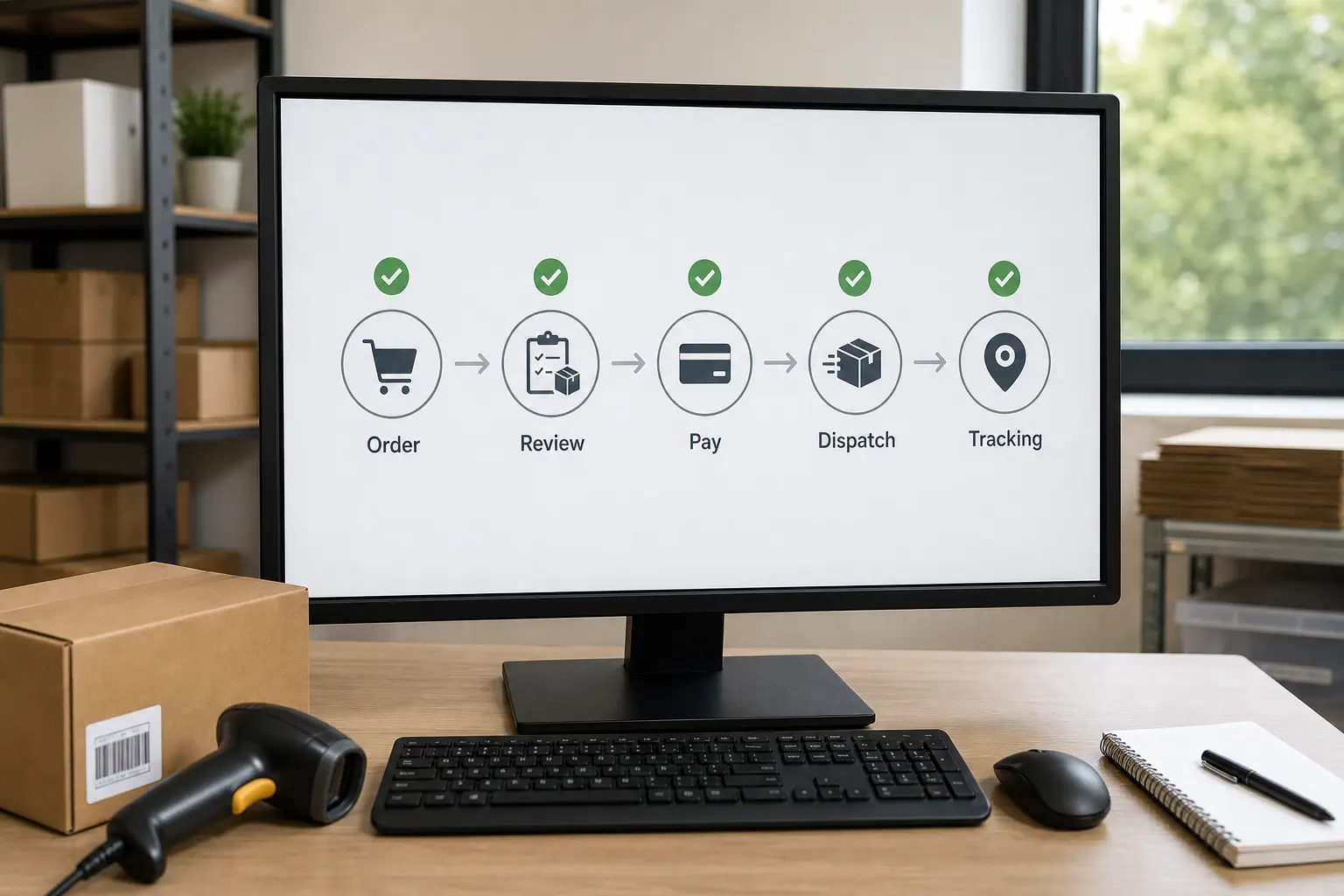
An app can move order data, but you still need a daily review process. The safest routine checks each order before supplier payment and watches it until valid tracking reaches the customer.
Review before placing the supplier order
Confirm the customer’s address, phone requirement, variant, quantity, item cost, shipping cost, and expected delivery range. Hold the order when the price changed, the selected variant is unavailable, or the supplier’s shipping option no longer matches your promise.
DSers can move store orders into its AliExpress order workflow and synchronize order and tracking information, while Wix orders connected through Modalyst first appear in the Modalyst order workflow. For standard Modalyst suppliers, payment can be processed through Modalyst; AliExpress-sourced orders follow a separate process in which the order is synced to AliExpress and paid there. In every case, the customer’s payment to your Wix store and your payment for supplier fulfillment are separate transactions.
Monitor dispatch and tracking
Check whether the supplier dispatches within the time you allowed. A tracking number is useful only after it belongs to the correct order and begins showing credible movement.
If tracking does not update, contact the supplier early and communicate with the customer based on verified information. Do not send an optimistic date simply to close a support ticket.
Handle exceptions from one record
Keep the customer order, supplier order number, product link, selected variant, shipping method, tracking number, messages, and refund decision together. This record becomes especially important when a supplier changes a listing or when several people manage the store.
For agencies, coaches, or operators supporting several Wix stores, use the same exception fields across projects. A repeatable record makes it easier to see which supplier, product, or shipping promise keeps creating work.
Calculate the Real Margin Before You Advertise
Your margin is the selling price minus every cost required to win, process, deliver, and support the order. Product price alone is not a useful profitability test.
Use this planning formula:
Expected order margin = selling price - product cost - shipping - app allocation - payment fees - advertising cost - tax or duty you cover - expected refund and replacement allowance - support cost
The app allocation is the portion of a monthly tool cost assigned to an order. The refund and replacement allowance is a planning reserve based on your own verified results after launch, not a number copied from another store.
Run three versions before advertising:
- Expected case: the normal verified product and shipping cost.
- Cost increase: the supplier price or shipping charge rises.
- Problem order: you pay for a replacement, refund, or extra support.
A product may look attractive at the expected cost and fail as soon as shipping changes or customer acquisition becomes expensive. Build that possibility into the decision before raising ad spend.
Key Takeaway: Test margin with the delivered and supported order cost, not the supplier’s product price. If the offer cannot absorb a realistic problem order, it is not ready for aggressive promotion.
Control the Main Risks
Most failures come from a broken promise between the supplier listing and the customer order. Control the promise before trying to automate more volume.
| Risk | Early warning | Control |
|---|---|---|
| Price or stock change | App alert, missing variant, supplier message | Review active products and pause unavailable variants |
| Product mismatch | Inconsistent photos, vague specifications, sample problem | Test the exact variant and keep approved specifications |
| Slow or uncertain delivery | Shipping option disappears or tracking stalls | Use destination-tested methods and communicate verified ranges |
| Supplier packaging appears in the parcel | Sample includes invoice, coupon, or marketplace material | Confirm packing instructions and retest after supplier changes |
| Split customer experience | Items come from different sellers or origins | Explain separate parcels when necessary and reduce avoidable multi-supplier orders |
| Weak exception handling | No owner for delayed, wrong, or damaged orders | Assign a daily review and a documented decision path |
Customer-facing policies must match what you can execute. Your supplier’s dispute process does not automatically become a workable return or refund policy for your store.
Also confirm product restrictions, labeling needs, taxes, consumer rules, and import requirements for the markets where you sell. These depend on the product and destination, so use qualified local advice when the risk is material.
Decide When AliExpress Is No Longer the Best Fit

AliExpress can work well for early product testing, but you should reassess it when repeated orders expose limits that an app cannot solve. The signal is not a fashionable revenue threshold; it is recurring operational friction.
A dropshipping store growth case can also show how sourcing, QC, packaging, and shipping problems begin to compound when demand grows faster than backend control.
Consider another sourcing and execution model when you repeatedly need:
- stable quotes and supplier communication outside a public listing;
- product checks before individual customer parcels leave;
- custom packaging, inserts, labels, or bundled products;
- consolidation of items from multiple suppliers;
- shipping choices matched across products and destinations;
- one accountable contact for sourcing, order issues, and after-sales follow-up.
First try to fix the specific problem. A better supplier, revised customer promise, or improved order check may be enough. If the same limits continue across products or stores, compare moving from AliExpress to a private agent as an operating change rather than merely replacing one app with another.
A private dropshipping agent can coordinate sourcing, samples, product checks, packaging, order execution, shipping arrangements, and issue handling through one workflow. That model is usually more relevant after you have real orders and a repeatable product need, not when you only want to copy a large free catalog.
Key Takeaway: Stay with AliExpress while it gives you a controlled, testable workflow. Move beyond it when repeated supplier, quality, packaging, consolidation, or support needs require coordination that the marketplace-and-app setup cannot provide.
FAQ
Can I build the store before paying for a Wix ecommerce plan?
Yes. Wix currently says you can design the site and add products before upgrading, but you need an eligible Premium plan to accept customer payments. Use the build stage to test product pages and app connections, then confirm the current regional plan and payment requirements before launch.
Should I tell an AliExpress supplier that I am dropshipping?
Yes. Ask the supplier not to include price invoices, promotional cards, QR codes, or marketplace marketing in customer parcels, and confirm the request with a sample. A message is helpful, but the received parcel is the stronger check.
Can one Wix order contain products from several suppliers?
It can, but the customer may receive separate parcels with different tracking numbers and delivery dates. Use multiple suppliers only when the customer communication and margin can support that split experience.
Who handles a return when the supplier shipped the product?
You remain the customer’s point of contact because the customer bought from your Wix store. Decide the customer remedy first under your published policy and applicable rules, then pursue the supplier-side refund or dispute separately; do not make the customer wait for an uncertain marketplace outcome without clear communication.
Conclusion
The workable setup is simple to describe but demanding to run: connect one suitable app, import one carefully checked product, test the full order path, calculate the complete order cost, and control the promise you make to customers. Automation should remove repeated data work without removing your review of products, suppliers, shipping, and exceptions.
When real order volume outgrows a marketplace-led process, Runtodropship can support qualified sellers, agencies, coaches, and multi-store operators through a private-agent workflow for sourcing, samples, product checks, packaging, order execution, shipping arrangements, and after-sales coordination. Send the product link, target countries, current order pattern, and the problems you need to solve to discuss the next practical step.