
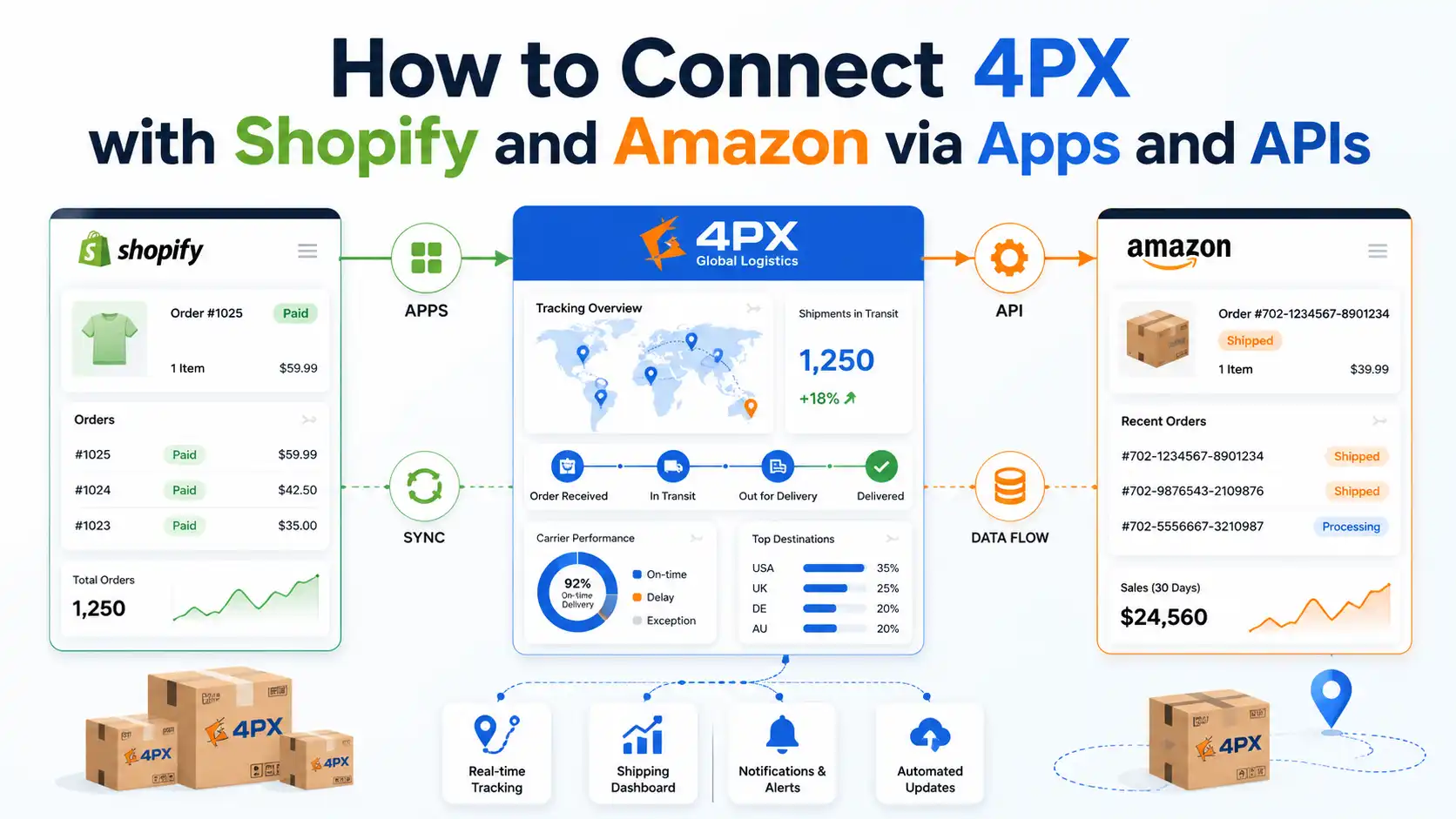
4PX with Shopify and Amazon works through different tracking workflows. In Shopify, the main challenge is keeping the correct tracking number, carrier mapping, app data, and customer notifications synchronized. On Amazon, sellers need to submit the correct carrier and tracking number, while buyers need to understand what “Shipped with 4PX” means and why tracking may pause before the first physical scan or during a last-mile handoff.
This guide focuses on the platform layer: how 4PX tracking data reaches Shopify and Amazon, how tracking apps, APIs, and ERP connections handle shipment updates, and why synchronization sometimes fails. For the carrier-level background behind those events—including pickup, export handling, customs, and last-mile delivery—our guide to what 4PX shipping is and how it works provides the broader context.
What Does “Shipped with 4PX” Mean on Amazon?
“Shipped with 4PX” on Amazon means the order is being transported by 4PX Worldwide Express, a large cross-border logistics provider that handles millions of ecommerce parcels moving internationally. It is not a mystery carrier or a placeholder — Amazon officially recognizes 4PX as a valid shipping carrier, which you can confirm on Amazon’s carrier help page for 4PX.
For buyers, this label usually means one simple thing: the parcel is traveling internationally, most often from a fulfillment origin in Asia, and will typically be handed to a local carrier for final delivery. That’s normal cross-border logistics, not a red flag.
For sellers, the label matters more. If you fulfill orders yourself (FBM) and enter 4PX as the carrier, Amazon can validate the tracking number against 4PX’s systems. That validation feeds directly into your Valid Tracking Rate (VTR), the metric Amazon uses to measure whether your tracking numbers actually work — see Amazon’s Valid Tracking Rate policy for the exact requirements.
Here is the practical implication most sellers miss: if your supplier ships via 4PX but you enter the carrier as “Other” or paste the wrong carrier name, Amazon may fail to validate the number. A working tracking number entered under the wrong carrier still damages your VTR, and a persistently low VTR can restrict your ability to sell in a category.
One more clarification, since buyers often panic here: seeing 4PX on Amazon does not mean the tracking is fake. Delays between label creation and the first physical scan are a sync issue, not a fraud signal — we cover the legitimacy question in full in our dedicated guide on whether 4PX is legit.
How 4PX Tracking Numbers Actually Flow to Your Store
A 4PX tracking number passes through at least four systems before your customer ever sees it, and a failure at any step looks identical to the customer: “my tracking doesn’t work.” Understanding this chain is the foundation for fixing every sync problem later in this article.
The typical flow looks like this:
- Your supplier or agent creates a shipping label in 4PX’s system. A tracking number now exists, but the parcel may still be sitting in a warehouse.
- 4PX scans the parcel at pickup or at a sortation center. This is the first moment real tracking events exist.
- The tracking number is pushed to your store — manually, through a fulfillment tool, or through an ERP connection.
- Your store or tracking app notifies the customer, ideally after real movement exists, not before.
Two structural facts about this chain cause most of the confusion. First, the tracking number is born before the parcel moves, so a “no updates yet” window at the start is built into the model. Second, when the parcel reaches the destination country, 4PX often hands it to a local delivery carrier, which can introduce a second tracking number — who handles that last mile varies by country, and we break it down in our separate last-mile guide.
You can always verify raw checkpoint data on the 4PX official tracking page. If the official page shows events but your store doesn’t, the problem is in your sync layer — not with the carrier. That single diagnostic step will save you hours.
Setting Up 4PX Tracking in Shopify
There is no single official “4PX app” that every Shopify seller must install — 4PX tracking reaches Shopify through three main routes, and choosing the right one depends on how you fulfill orders. Listings for “4PX ‑ Shipping” apps exist in various app directories, but most dropshipping sellers never touch them because their fulfillment tool or agent handles the connection.
Route 1: Manual entry. You mark the order as fulfilled, paste the tracking number, and select the carrier. Shopify attempts to auto-detect the carrier from the number format; if it can’t, you can select the carrier manually or choose “Other” and supply a tracking URL. The mechanics are documented in Shopify’s fulfillment documentation.
The critical detail: if Shopify assigns the wrong carrier, the tracking link in the customer’s shipping confirmation email points to the wrong website. The customer clicks, sees “tracking number not found,” and opens a support ticket — even though the number itself is perfectly valid.
Route 2: Fulfillment automation tools. If you source through marketplace suppliers, tools like DSers or AutoDS pull the tracking number from the supplier’s order and push it into Shopify automatically. This removes copy-paste errors, but it inherits whatever delay exists on the supplier’s side — if the supplier uploads the number three days after creating it, your customer waits three days too.
Route 3: ERP or agent-side sync. Sellers working with a fulfillment partner or private agent typically have tracking numbers pushed directly from the agent’s ERP into Shopify the moment shipments are executed. This is the tightest loop, because the party creating the shipment and the party updating your store are the same.
Whichever route you use, apply one rule consistently: the carrier field should say 4PX (or the correct last-mile carrier), never “Other” with no URL. A blank or wrong carrier field is the single most common self-inflicted tracking failure we see in Shopify stores.
How AfterShip, ParcelPanel, and Other Apps Recognize 4PX
Tracking apps recognize 4PX through a carrier identifier — usually the slug 4px — and they either auto-detect it from the tracking number pattern or rely on the carrier field passed from your store. AfterShip’s 4PX carrier integration is a good example: once a shipment is mapped to the 4PX courier, the app pulls checkpoint events from 4PX and normalizes them into standardized statuses like “In Transit” or “Out for Delivery.”
This normalization is genuinely valuable for dropshipping sellers. Raw 4PX checkpoint descriptions can be technical and confusing to customers; a good tracking app translates them into plain language on a branded tracking page hosted on your own domain, which keeps the customer on your site instead of a third-party tracker.
ParcelPanel, Track123, 17TRACK, and similar apps work on the same principle: carrier identification, checkpoint pulling, status normalization, and customer notification. If you’re still choosing your tool stack, we compare the main options in our guide to the best dropshipping apps for Shopify.
Where these apps go wrong is courier auto-detection. Some 4PX tracking number formats overlap with other carriers’ formats, so an app may guess the wrong courier and pull zero checkpoints. Every major tracking app lets you set courier mapping rules — for example, “shipments from this store, or numbers matching this pattern, always map to 4PX.” Setting that rule once eliminates an entire category of “tracking not found” tickets.
One configuration decision matters more than any other: when the app notifies your customer. If the “your order has shipped” email fires the moment a label is created, you’ve promised movement before movement exists. Configure notifications to trigger on the first physical carrier scan instead, and the early “why hasn’t my tracking updated” wave largely disappears.
The 4PX Tracking API: What It Is and Who Should Use It
The 4PX tracking API is a developer interface that lets a system query shipment checkpoints programmatically, instead of pasting numbers into a web page. 4PX exposes this through its open platform for registered account holders, and it’s the same data source that tracking aggregators tap into.
At a high level, the API lets an authorized system do three things: submit tracking numbers for monitoring, retrieve checkpoint events, and receive updates as shipments move. This is how ERPs and tracking platforms keep thousands of shipments current without anyone manually checking anything.
Here is the honest guidance most articles skip: the vast majority of dropshipping sellers should not integrate the 4PX API directly. Direct integration makes sense in three scenarios only:
- You run high order volume with an in-house tech stack and want carrier data without a per-shipment app fee.
- You operate a custom ERP or OMS that needs 4PX events merged with other carriers’ events in one pipeline.
- You manage multiple stores or clients (agency-style operators, coaches running several seller accounts) and need centralized tracking visibility.
For everyone else, an aggregator API or an off-the-shelf tracking app achieves the same outcome with none of the maintenance burden. Carrier APIs change, authentication tokens expire, and checkpoint formats get updated — an aggregator absorbs all of that for you.
If you work with a fulfillment agent, ask a simpler question instead: does your agent’s ERP push tracking events into your store automatically? If yes, you already have API-grade sync without writing a line of code. That’s usually the better architecture for a growing store.
Why 4PX Tracking Doesn’t Sync Correctly (The Three Real Causes)
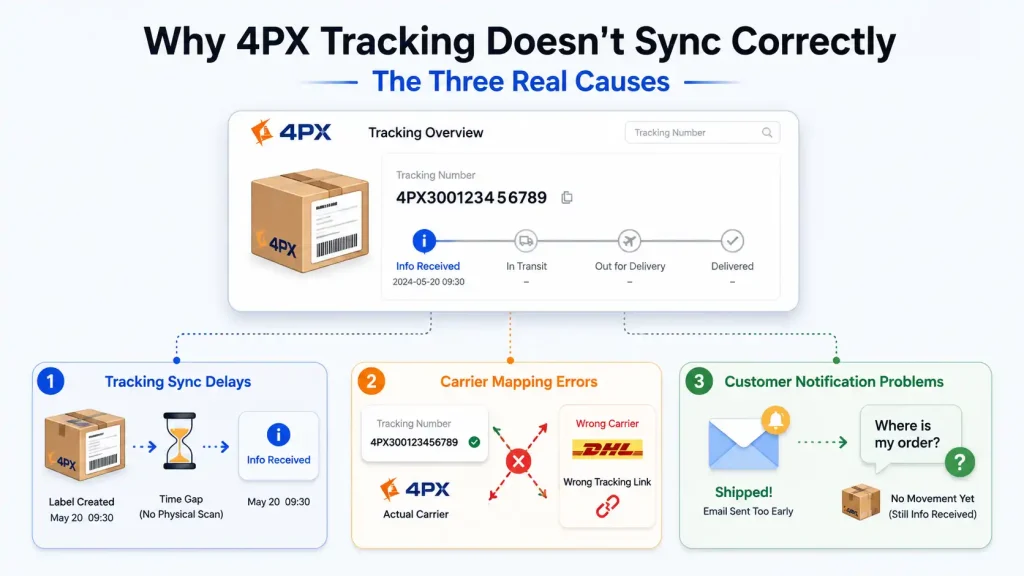
Almost every “4PX tracking is broken in my store” complaint traces back to one of three causes: a timing gap, a mapping error, or a notification misfire. Diagnosing which one you have takes about two minutes once you know what to look for.
Cause 1: Tracking Sync Delays
The most common issue is a gap between when the tracking number is created and when real events appear. The supplier generates a label to meet a processing deadline, but the parcel hasn’t been picked up or scanned yet — so every system downstream shows “no information found” or “info received.”
This is a supply-side timing problem, not an app problem. No Shopify app can create tracking events for a parcel that hasn’t physically moved. If this gap is consistently long with a particular supplier, the fix is upstream: a supplier or agent that ships within a defined window, not another tracking tool.
A related note: once events do appear, some intermediate status descriptions confuse customers badly. We decode the full status vocabulary — including the ones that cause the most panic — in our dedicated guide to 4PX tracking statuses, so this article stays focused on sync mechanics.
Cause 2: Carrier Mapping Errors
The second cause is a valid tracking number attached to the wrong carrier identity. Shopify guessed the wrong carrier, or your tracking app auto-detected a different courier, so the customer’s tracking link leads to a site that has never heard of their parcel.
The symptom is distinctive: the number works perfectly on 4PX’s official tracker but shows nothing in your store’s link. The fix is mechanical — correct the carrier field in Shopify, and set a fixed courier mapping rule in your tracking app so future shipments can’t be misassigned.
One seller we worked with ran a home-goods store where every 4PX shipment was being auto-assigned to a different carrier by their tracking app, so customers received confirmation emails with dead tracking links. Their support inbox treated it as a shipping crisis, but nothing was wrong with the shipments themselves. After we took over order execution, tracking numbers were pushed from our ERP with the carrier explicitly mapped, and the “tracking not found” tickets stopped — the parcels had never been the problem; the mapping was.
Cause 3: Customer Notification Problems
The third cause is notifications that fire at the wrong moment or say the wrong thing. A “shipped” email triggered at label creation, a raw checkpoint description forwarded verbatim, or a delivery-date estimate that doesn’t match the actual route — each one manufactures a support ticket out of a normal shipment.
The principle to configure around: notify on real events, in plain language, with expectations that match your actual route. If your route genuinely takes longer than your product page implies, no notification setting can close that gap — that’s a route decision, and it’s worth reading our guide on fast shipping for dropshipping before you tune another email template.
How Dropshipping Sellers Reduce Manual Tracking Work
The goal is a tracking pipeline where no human copies a number anywhere — every manual touch is a delay and a typo waiting to happen. Sellers who reach this state handle 10x the order volume with the same support load.
Four practices get you most of the way there:
Automate the number handoff. Tracking numbers should flow from supplier to store through a tool or ERP connection, never through spreadsheets. If you’re using marketplace suppliers, your fulfillment automation tool handles this — our DSers vs AutoDS comparison covers which fits which workflow.
Fix carrier mapping once, globally. Set explicit courier rules in your tracking app so 4PX shipments can never be misdetected. This is a five-minute configuration that prevents a permanent trickle of tickets.
Gate notifications on the first scan. Customers should hear “shipped” when the carrier has physically touched the parcel. This one setting eliminates the most predictable complaint in cross-border dropshipping.
Keep one source of truth. When a customer asks about an order, your team should check one dashboard — not Shopify, then the supplier’s panel, then the carrier site. Whether that’s your tracking app or your agent’s ERP matters less than there being exactly one.
Notice what these four practices have in common: they’re all about connection quality between systems, not about which individual app you install. That leads to the real conclusion of this article.
When Apps Alone Aren’t Enough: Fixing the Source-to-Tracking Loop
Tracking apps fix the display layer, but most 4PX tracking pain is created upstream — before the app ever sees a number. An app cannot make a supplier ship on time, cannot choose a route with better scan density, and cannot chase a shipment that stalled at a handoff.
Think about what actually broke in the three causes above. Sync delays come from supplier execution. Mapping errors come from fragmented handoffs between systems that don’t share data. Notification problems come from route reality not matching store promises. All three live in the source-to-shipment layer, not the app layer.
This is where a private dropshipping agent changes the architecture rather than patching it. At RuntoDropship, order execution and tracking are one pipeline: we source and QC the product, confirm packaging before dispatch, match each SKU to a route with the tracking visibility it needs, push tracking numbers into your store through ERP sync, and then actively follow up on shipments — chasing exceptions before your customer notices them, instead of after they email you. If your current setup means checking a supplier panel every morning, our sourcing agent service page explains how that pipeline works end to end.
The difference is easiest to see at the exception level. With a marketplace supplier, a stalled shipment is your problem to notice, research, and escalate with no direct carrier relationship. With an agent executing your orders, the party who created the shipment is the party watching it — and the same team handles dropshipping quality control before parcels ever enter the carrier network, which prevents a whole class of exceptions from existing.
If you’re currently fulfilling through AliExpress-style suppliers and the tracking chaos is eating your support hours, our guide on moving from AliExpress to a private agent walks through what that migration looks like in practice. Apps are worth configuring well — but configuration can’t fix a fragmented supply chain, only a connected one can.
FAQ
What does “Shipped with 4PX” mean on Amazon?
It means the order is carried by 4PX Worldwide Express, a cross-border logistics provider that Amazon recognizes as a valid carrier. The parcel is typically traveling internationally and may be handed to a local carrier for final delivery.
Is there an official 4PX Shopify app?
There’s no single mandatory app. Most sellers get 4PX tracking into Shopify through manual entry, fulfillment automation tools, or an agent’s ERP sync. What matters is that the carrier field is correctly set to 4PX so tracking links work.
Does AfterShip support 4PX tracking?
Yes. AfterShip, ParcelPanel, and most major tracking apps support 4PX as a mapped courier. If checkpoints aren’t appearing, check the courier mapping settings — misdetection is the usual cause.
Why is my 4PX tracking number not updating in Shopify?
First test the number on 4PX’s official tracker. If events show there but not in your store, you have a carrier mapping or sync issue. If no events show anywhere, the parcel likely hasn’t received its first physical scan yet.
Should I integrate the 4PX API directly?
Only if you run high volume with a custom tech stack, or manage many stores centrally. Most sellers get the same result through a tracking app, an aggregator, or an agent’s ERP connection with far less maintenance.
What is a good Valid Tracking Rate practice when using 4PX on Amazon?
Always enter 4PX as the named carrier rather than “Other,” and upload tracking promptly after shipment. Amazon validates the number against the carrier you declare, so the correct carrier name is as important as the number itself.
Conclusion
4PX works fine with Shopify, Amazon, and every major tracking app — when the connections between systems are configured deliberately. The recurring failures are always the same three: numbers created before parcels move, carriers mapped incorrectly, and notifications that promise more than the route delivers.
Fix the mapping, gate your notifications on real scans, and automate the number handoff, and most of your tracking tickets disappear. But if the problems keep regenerating no matter how well you configure the display layer, the issue isn’t your apps — it’s that sourcing, shipment execution, and tracking follow-up are being handled by parties who don’t talk to each other. Closing that loop is exactly what a private dropshipping agent is for.