

A customer has paid for two stocked products and an item coming from a supplier. Hybrid fulfillment needs a usable assignment for each part of that order.
Your local team starts packing while a partner receives the same order. Both can see the sale, but neither has a clear instruction about which quantities to dispatch. Establish which source can fulfill the item, what it can promise and who currently owns the dispatch instruction. When the plan changes, confirm the original work has stopped before releasing the same quantity elsewhere.
What does hybrid fulfillment change for an active store?
Hybrid fulfillment combines more than one fulfillment method, such as in-house and third-party fulfillment. You might keep some products locally while another operator handles stocked orders or a supplier ships selected items directly.
The wider order fulfillment process still connects stock, preparation and delivery. The extra decision is how those jobs are divided for a particular order. If you are still choosing which work to retain, the 3PL versus in-house logistics comparison addresses that earlier decision.
Separate the jobs behind one customer order
A third-party logistics provider, or 3PL, can be one operator in the arrangement. Its physical involvement does not settle every purchasing or approval question. Identify these jobs separately:
- Stock decisions: who supplies the goods and authorizes another purchase?
- Physical handling: who holds, prepares and dispatches the assigned quantity?
- Exception decisions: who approves a changed source, expense or customer commitment?
In September 2025, Target described concentrating Chicago shipping in selected stores, increasing fulfillment center volume, and using inventory locations and staffing to inform online order assignments. This illustrates a deliberate job for each location; it does not establish how your own partners allocate work.
Key Takeaway
Give each route a defined job before treating it as another place to send orders.
Which inventory can each route actually promise?
Start with stock that the proposed source can release for this item and destination. A hybrid fulfillment arrangement becomes difficult to manage when a supplier feed, an incoming transfer and ready local stock all look like the same available pool.
Check available stock and destination eligibility
In Shopify, On hand includes Available, Committed and Unavailable stock; Incoming stock is not Available until it is received and its state becomes Available. Those inventory-state definitions help separate goods on site from goods ready to sell. For supplier reservations and small stocked batches, the Shopify dropshipping inventory guide covers the separate stock-planning decision.
For Shopify online-store fulfillment, recorded stock alone is insufficient: the product must be active at the location and the location must be allowed to fulfill those online orders. Shopify’s fulfillable-inventory rules consider stock at locations that ship to the customer’s shipping zone, rather than stock anywhere in the business. Check the documented location setup and destination eligibility against your actual configuration.
- Confirm the exact item and quantity at the proposed origin.
- Separate ready stock from reserved, incoming or unconfirmed units.
- Check whether that source can serve this item and destination.
- Record who approves stock release or a replenishment purchase, separately from who holds the goods.
Key Takeaway
Use the quantity that this eligible source can release, rather than the largest balance displayed.
How should you choose a route for each order line?
For each order line and quantity, check source eligibility, available stock and the customer promise before applying your routing priority. An order line identifies an item and its ordered quantity; it can need a different assignment from another item in the basket.
Shopify applies routing rules from top to bottom, with each rule applied to the previous rule’s results. Check the rules actually configured for your store. Assign one current dispatch owner to each routed quantity, and record an approved handoff before another source acts on it.
Work through a small allocation record
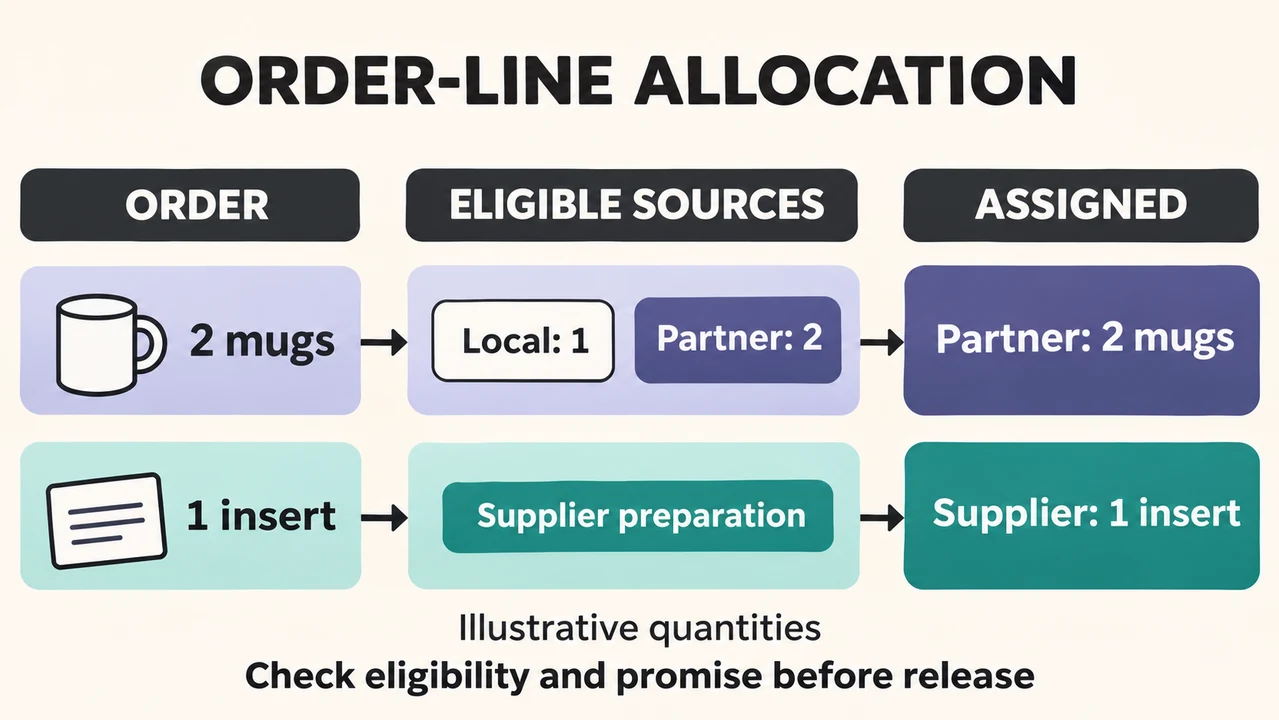
Consider this illustrative order with assumed stock counts: two mugs and one printed insert.
- Local stock has one mug and the partner has two; both meet the destination and handling requirements, and the partner can meet the promised timing.
- The insert has its own approved preparation route.
- Your stated preference is fewer parcels after those requirements are satisfied.
| Order line | Eligible stock or preparation | Recorded assignment | Reason |
|---|---|---|---|
| Two mugs | Local: one; partner: two | Partner: two mugs | One eligible source can fill this line within the agreed promise. |
| One printed insert | Approved supplier preparation | Supplier: one insert | The required preparation belongs to that source’s agreed work. |
Read the assignment column as quantities to execute. The spare local mug is not an instruction to dispatch another unit. If you prefer to use local stock first, assess the resulting split and customer promise before changing the record.
Key Takeaway
Record which quantity each source should dispatch and the reason for that assignment.
When should a mixed order ship in separate parcels?
Before release, check that the assigned sources and planned parcels match the customer’s checkout promise. In Shopify, a single order can use different fulfillment methods for different items.
The question is whether the proposed split is compatible with what the customer bought. A hybrid fulfillment plan may involve separate origins, but it still needs a clear choice about shipping separately, waiting or transferring goods before dispatch.
Check the parcel promise before release
Compare the actual basket with the package, timing and charge information shown before checkout. For the illustrative order, the mugs and insert have different preparation routes. Decide whether separate parcels fit the existing commitment or whether the order needs an approved alternative.
- Separate dispatch: confirm which items can leave under the existing promise.
- Wait: identify what must become ready before the held items are released.
- Transfer or consolidate: confirm the receiving and preparation work before relying on one outgoing parcel.
Include the extra handling or waiting in that assessment. A transfer does not, by itself, establish a shorter delivery time or a lower total cost. If the paid-order commitment needs to change, send that decision to the person authorized to approve it.
Key Takeaway
Check the original customer commitment before letting separate sources begin their assigned work.
How can you reassign an order without shipping it twice?
For accepted work, obtain the original operator’s cancellation acknowledgment before releasing that quantity to another source, and follow your platform’s reassignment conditions. Changing a hybrid fulfillment route requires control of work already in progress as well as a new destination.
Wait for the original operator’s answer
In Shopify’s app-integrated fulfillment workflow, canceling an accepted fulfillment requires a cancellation request and a response from the fulfillment service; rejection leaves fulfillment continuing. Reverting a Shopify order to Unfulfilled does not itself stop the fulfillment service from shipping it. The app-fulfillment guidance distinguishes those conditions. Keep completed and remaining quantities separate when discussing a change, and follow the source’s actual workflow:
- In Shopify, already fulfilled items remain assigned to their original location when the remaining work is reassigned.
- Before a request is sent, confirm that the first operator has no active instruction.
- After a request is sent, establish its current acceptance and cancellation state.
- After acceptance, obtain the required stop response and confirm what unfulfilled quantity can move.
A pending request is a reason to investigate, rather than evidence that a second operator can start. If the original source cannot stop, resolve the order’s actual stage before choosing the next action. These controls support coordination; they are not a guarantee that every parcel can be recalled.
Key Takeaway
Confirm the original stop and remaining quantity before another operator receives a release.
Who decides when the planned route cannot fulfill?
Keep the line on hold until a named decision-maker approves an executable alternative and any changed customer promise. A stock shortage can require a purchase, another origin or a different preparation plan; the person reporting the shortage may not have authority to approve those changes.
Name the person who can approve the alternative
Make the proposed decision specific enough to answer. “Use the other supplier” leaves important questions open if that supplier only delivers goods into your operation and does not dispatch customer orders. State the following before seeking approval:
- The affected item, remaining quantity and reason for the hold.
- The proposed source and the work it will actually perform.
- The purchasing, cost or customer-commitment change requiring approval.
RuntoDropship can compare supplier options and clarify quote and sample requirements before products enter fulfillment. Its sourcing-agent service is relevant when the alternative needs supplier review before goods are ready for order preparation; RuntoDropship offers an agreed trial for selected SKUs or orders while the seller keeps its current channel available. Confirm the selected scope through its dropshipping fulfillment service, including which orders remain with the existing operator. A service discussion does not itself change the current dispatch instruction.

Key Takeaway
Approve an alternative that can perform the required work before releasing the held quantity.
What records show that each line has one current route?
Before dispatch, reconcile each line’s remaining quantity and current operator with the release record, including any required stop acknowledgment. This is a check of the current hybrid fulfillment assignment after decisions have been made.
Reconcile the quantities before the next release
Return to the two-mug example. The partner’s assignment is two mugs. If the local worksheet still contains an active instruction for one mug from that same order, investigate the conflict before another release. Available local stock does not explain why the extra instruction is still active.
- Match the order, item or variant and unit of measure.
- Account for the quantity already completed and the quantity still assigned.
- Identify the current operator for each remaining portion.
- Check the evidence supporting an approved change and keep unresolved portions held.
Use the latest confirmed record rather than copying an earlier instruction into a new message. Multiple records can describe stages of the same order, so establish which one currently authorizes work. The purpose is to expose a missing or conflicting assignment before it becomes another dispatch instruction.
Key Takeaway
Resolve conflicting quantities or current operators before the next release.
Conclusion
A workable hybrid fulfillment arrangement connects each quantity to an eligible source, a customer promise and a current dispatch owner. When conditions change, the original work and the proposed replacement need separate confirmation. Clear release records make those decisions easier to inspect.
Key Takeaway
RuntoDropship, a China-based dropshipping agent, can coordinate China-side stock and order-preparation exceptions, with seller approval where required. To discuss the work that needs coordination, share:
- Your current SKUs and stock locations.
- Destination markets and customer commitments.
- Who approves stock, purchasing and route changes.
Agree the handling scope before transferring selected orders or changing the existing dispatch instruction.
FAQ
Can customers pick up local items from a mixed order?
Shopify’s native ship-and-pickup-in-one-order option is currently a feature test drive limited to Plus and Enterprise organizations. Confirm that your checkout and connected apps support the intended combination before offering it. Local stock alone does not establish that one basket can combine collection and shipping through your particular setup.
Can variants of one product use different suppliers?
Shopify supports stocking a product at store and fulfillment app locations simultaneously, with inventory tracked separately at each location. Check whether your actual connector supports the intended variant-to-supplier mapping. Keep each variant’s identifier and source mapping clear, then verify the intended variant reaches the intended supplier without creating an unnecessary duplicate listing.
How does each supplier receive only its assigned items?
Use the request method the provider supports and check which items it receives. Shopify custom email fulfillment sends the provider order details, including which items to ship. Shopify’s custom email fulfillment services do not automatically update fulfillment progress in the admin. Confirm progress directly rather than treating the outgoing email as a shipment update.
How should returns stay linked to the right fulfillment source?
Match each returned item to its original source and approved return instructions before confirming where the customer should send it. Keep the original order, item, returned quantity and dispatch source together. Record the approved receiving destination separately, so a return involving one source is not casually applied to another source’s portion of the order.
Why can’t one tracking entry use different carriers?
In Shopify’s documented Add another tracking number workflow, the numbers added together must use the same carrier. Shopify’s manual partial-fulfillment flow lets you enter item quantities and give each fulfillment its own tracking number and customer notification. Shopify’s order status page supports partial fulfillments across different carriers and adds sections for multiple fulfillments.