

Your dashboard shows fast fulfillment, but customers are still waiting for their purchases. Those observations can concern different parts of the journey. Order cycle time, as used here, measures the customer's wait from placing an order to receiving it. Calculate that duration for each order before averaging a defined group.
A useful report includes the event definition, the orders counted and the records behind each result. That lets a seller distinguish a calculation problem from time spent waiting on stock, preparing the parcel or transporting it.
What does order cycle time measure for a customer?
Customer order cycle time measures the interval from the customer's order to delivery, under the definition used here. APQC defines its customer-order measure as an average between placement and delivery, including weekends; an internal warehouse report can use a narrower interval.
Give the number a specific job
Decide which wait you need to explain. The wider order fulfillment process connects stock, preparation and transport. A duration report selects particular events from that process; it does not describe every responsibility within it. Alongside a descriptive label such as customer order-to-delivery hours, identify:
- The customer order or order group being measured.
- The event that starts its recorded wait.
- The event that establishes completion.
- Whether the result represents elapsed hours or calendar days.
The APQC customer-order definition provides one stated convention. It does not establish a suitable delivery target for every product, destination or stock arrangement. A fast warehouse interval and a long customer wait can both be accurate. Key Takeaway: Give the duration a named interval before using it to judge a supplier or explain an order's progress.
Which start and end events should you record?
Record two named events, with supporting timestamps for the same order. Choose events that answer your question instead of assuming that a familiar report label establishes its boundaries.
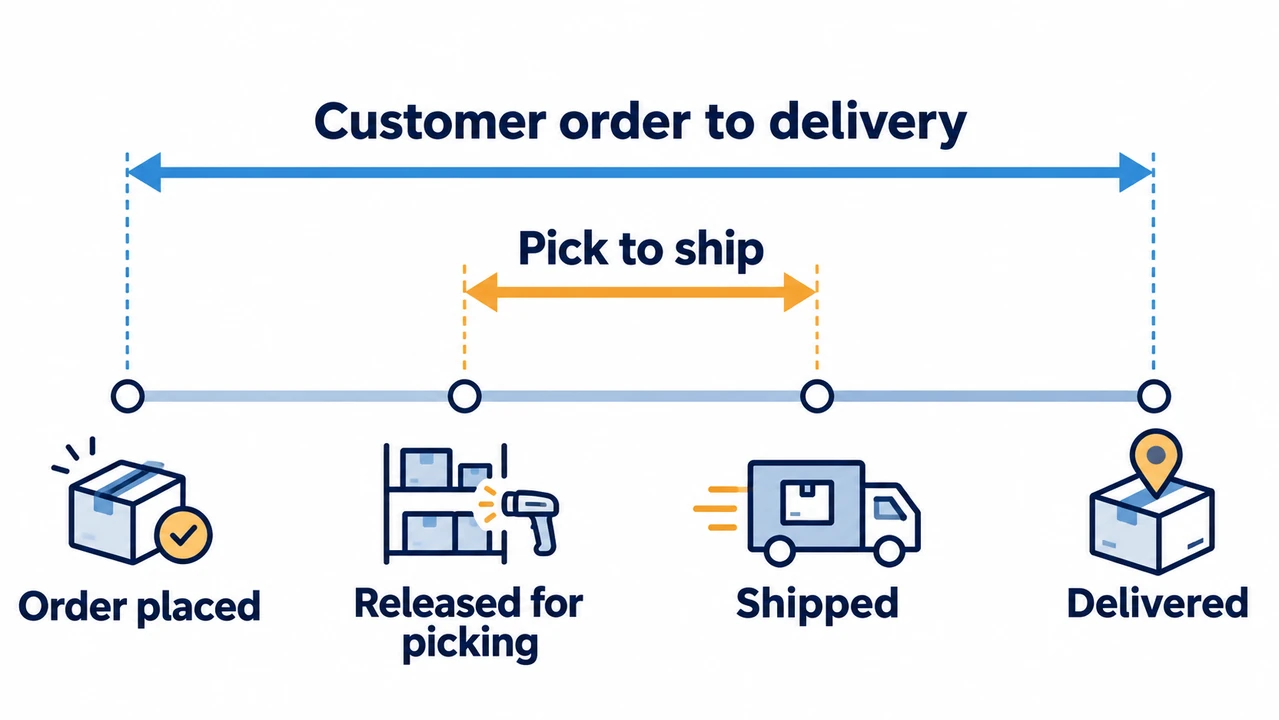
Match events to their source records
APQC's pick-to-ship measure starts when an order is released for warehouse picking and ends at shipment, excluding customer transit. For orders requiring shipping, Shopify describes fulfillment time as order placement through handoff to a carrier. Neither endpoint establishes customer delivery. Before using a record, confirm its events:
- Which order the event belongs to.
- Whether the event means placement, release, handoff or delivery.
- Which system or party supplied the evidence.
- Whether both timestamps use a stated time zone and unit.
A generated label or tracking number can exist before the relevant physical event. If your chosen finish is delivery, obtain its delivery record rather than substituting the label's creation time. Keep the chosen definition with the export or calculation so another team member can reproduce it. Key Takeaway: Compare the event meanings before comparing the numbers; changing the finish event changes the question being measured.
How do you calculate one order's elapsed time?
Subtract an order's start timestamp from its finish timestamp after putting both on the same time basis. Express the difference in a stated unit, such as elapsed hours.
Work from a complete pair of timestamps
Calculate one pair before building an average. The following records are constructed arithmetic examples, not RuntoDropship or customer data. All timestamps use UTC, and the finish event is customer delivery.
| Illustrative order | Placed, UTC | Delivered, UTC | Elapsed hours |
|---|---|---|---|
| A | October 1, 09:00 | October 4, 09:00 | 72 |
| B | October 1, 09:00 | October 5, 09:00 | 96 |
| C | October 1, 09:00 | October 7, 09:00 | 144 |
- Read across each row: the two timestamps belong to that one order, and the final column is their difference.
- For A, three elapsed days multiplied by 24 hours gives 72 hours. A spreadsheet can subtract valid date-time values, but inspect the stored format and time-zone assumptions first. A displayed date alone cannot recover an unknown time of day.
- Pair the start and finish for the same order.
- Convert both timestamps to a consistent time basis.
- Subtract once and retain the resulting duration.
- Do not divide A's 72-hour interval by the number of orders shipped that month. That would change its meaning. Production time divided by units produced is also a different calculation from this individual customer's elapsed wait.
Key Takeaway: Keep a reproducible time difference for every included order; the group calculation comes next.
How do you average durations for an order cohort?
Divide the sum of the included per-order durations by the number of those same valid event pairs. A cohort is the defined group of orders included in that calculation.
Keep the numerator and denominator together
For A, B and C, the total is 72 + 96 + 144 = 312 hours. Divide 312 by three completed orders to obtain a mean of 104 hours. Their median, the middle value when ordered, is 96 hours. Keep these details beside the result:
- Which orders qualify for inclusion.
- Whether the period selects order placement or completion.
- The number of valid paired records and their summed duration.
- The unit and statistic reported.
- For this example, a completion-period report would include the three deliveries within its stated window. A group selected by placement date can still contain unfinished orders. An unfinished record has no completed duration; keep it visible separately instead of inserting zero or presenting the completed subset as the entire original group.
Shopify's Shipping and delivery performance chart displays a median for the selected completed stage. A separately calculated mean can therefore differ without either calculation being wrong. Completeness percentages belong to the different fulfillment rate calculation. Key Takeaway: Reconcile the duration sum and order count before comparing averages, and name the statistic explicitly.
Which timestamp problems should you fix before averaging?
Resolve missing or reversed events, inconsistent units or time offsets, and unintended duplicate event rows before treating a difference as a valid duration. Preserve unresolved records so the report shows its limits.

Check the records that produced the number
Inspect questionable pairs individually. A negative duration can signal mismatched events, a parsing error or inconsistent time-zone treatment. It is a reason to investigate the source record, rather than an exceptionally fast order. Use a short validation check:
- Does each pair identify the same order and intended events?
- Are date-time values readable as dates rather than text?
- Have time-zone offsets and units been handled consistently?
- Is one event repeated because of an update or duplicate import?
- Is an absent finish recorded as unknown rather than zero?
Different systems can record different parts of an order's history. The existing order execution guide covers the operating evidence and exception responsibilities behind those records. For this calculation, keep the validation focused on whether the selected pair establishes the intended interval.
- Retain a reason for each unresolved pair and report how many valid durations remain. If the record cannot establish the chosen finish, leave that duration unknown until the missing evidence is resolved. A cleaner-looking average does not repair an unsupported timestamp. Key Takeaway: Investigate invalid differences before aggregation, while preserving the orders that could not yet be measured.
How do stage durations explain the total wait?
Adjacent, nonoverlapping event differences can explain the same order's total elapsed interval. Each stage needs the same order identity and boundaries that connect without gaps or double counting.

Use one continuous timeline
Follow one order through the recorded events. Placement, stock readiness, carrier handoff and delivery can support a useful timeline when those timestamps exist. Work completed before the customer ordered lies outside that order-to-delivery interval; overlapping activities cannot simply be added together. For each measured stage:
- Identify its starting and finishing event.
- Check that its finish connects to the next stage's start.
- Keep waiting time inside the interval where it occurred.
- Compare components on the same included orders.
- Distribution statistics need separate care. In another constructed example, three orders have two stage durations of 1 + 11, 10 + 10 and 11 + 1 hours. The stage medians are 10 and 10 hours, but the order totals are 12, 20 and 12 hours: their median is 12, not 20. Adding stage medians does not reproduce the total median.
Use the measured stage to choose your next check. If time accumulates after handoff, compare the relevant shipping options and their confirmed scope for the product and destination. If it accumulates before release, investigate the readiness record first. Key Takeaway: Use compatible stage records to locate waiting time, and calculate the total statistic from the actual order totals.
How can you compare and improve the same interval?
Compare results with matching endpoints, included orders and stock-readiness assumptions, then investigate the stage where that same clock records excess wait. A shorter reported interval can also result from measuring different work.
Compare the work inside the clock
In Extensiv's published Tushy story, the reported lead-time boundary runs from order placement through the factory to the customer. The vendor account also describes handling preorders before moving them to a fulfillment warehouse. That scope includes work a stocked parcel's pick-to-ship interval does not; it illustrates a boundary difference, without establishing a timing target for your store. Bring these details to the comparison:
- The same start, finish, time basis and statistic.
- Comparable products, destinations and readiness conditions.
- The completed-order count and unresolved-record count.
- The particular stage and evidence that need attention.
For China-side stock and preparation work, discuss the relevant dropshipping fulfillment arrangement against that measured need. Ask what records can confirm readiness or handoff under the proposed scope. Recalculate with the same definition after a change; a new label or later starting point cannot establish reduced customer waiting time. Key Takeaway: Choose the next operating change from a comparable measured interval, then check its result using the same clock.
Conclusion
A reliable order cycle time report connects each order to two defined events, preserves its elapsed duration and averages only the matching included records. It also keeps unknown intervals visible and separates a mean from a median. That provides a basis for discussing a specific delay rather than comparing incompatible headline numbers.
Choose the next check with your team
RuntoDropship, a Private Dropshipping Agent, can coordinate China-side sourcing, QC, inventory, order preparation and shipping, with the service scope confirmed for your products and destinations. Our position is to agree the evidence before promising an operating result. To discuss the relevant work, share:
- Your products, order profile and destinations.
- The interval you are measuring and its timestamp sources.
- The stage that needs investigation or coordination.
Key Takeaway: Ask for the next evidence check and the proposed responsibilities before changing the arrangement.
FAQ
Why can a fulfilled export date differ from an API date?
Shopify's order CSV defines Fulfilled at as the date fulfillment was completed for the order. The API's Fulfillment.createdAt records creation of a fulfillment, while updatedAt records its latest modification. An order can have several fulfillments. Confirm the field's event and order or fulfillment level before substituting one timestamp for another.
What does fulfillment status mean after an order is canceled?
Shopify documents Fulfillment not required for a canceled order or a full refund before fulfillment, and excludes that status from the Unfulfilled view. Check the actual order, payment and fulfillment states instead of marking an exception shipped merely to clear the queue.
How should I time an order sent in several shipments?
Shopify's Partially fulfilled status covers some items, while Fulfilled covers all items fulfilled and shipped. For a whole-order delivery clock, verify delivery of all included items; do not use the first dispatch as its completion.
Does purchase order cycle time measure customer delivery?
APQC's purchase-order issuance measure runs from receipt of a purchase requisition to release of the purchase order to the supplier, including weekends. Keep that procurement interval separate from a customer placement-to-delivery calculation.
How can I inspect orders behind a fulfillment total?
The Orders fulfilled over time report displays total counts of fulfilled, shipped or delivered orders for the selected period. Shopify documents exporting orders from the Orders page, and defines Id as the order ID. Use that identifier to inspect the underlying order records; do not assume a universal one-click drill-down from the aggregate.